2026-06-12
Mirror Selfie UGC Product Video Workflow
Turn a product image into a relaxed mirror selfie UGC clip with outfit fusion, POV framing, end-frame animation, and ecommerce-ready edits.
Try this workflow in Naviya
Turn a product, hook, or campaign idea into short social-ready ad concepts.
Create video ad variants
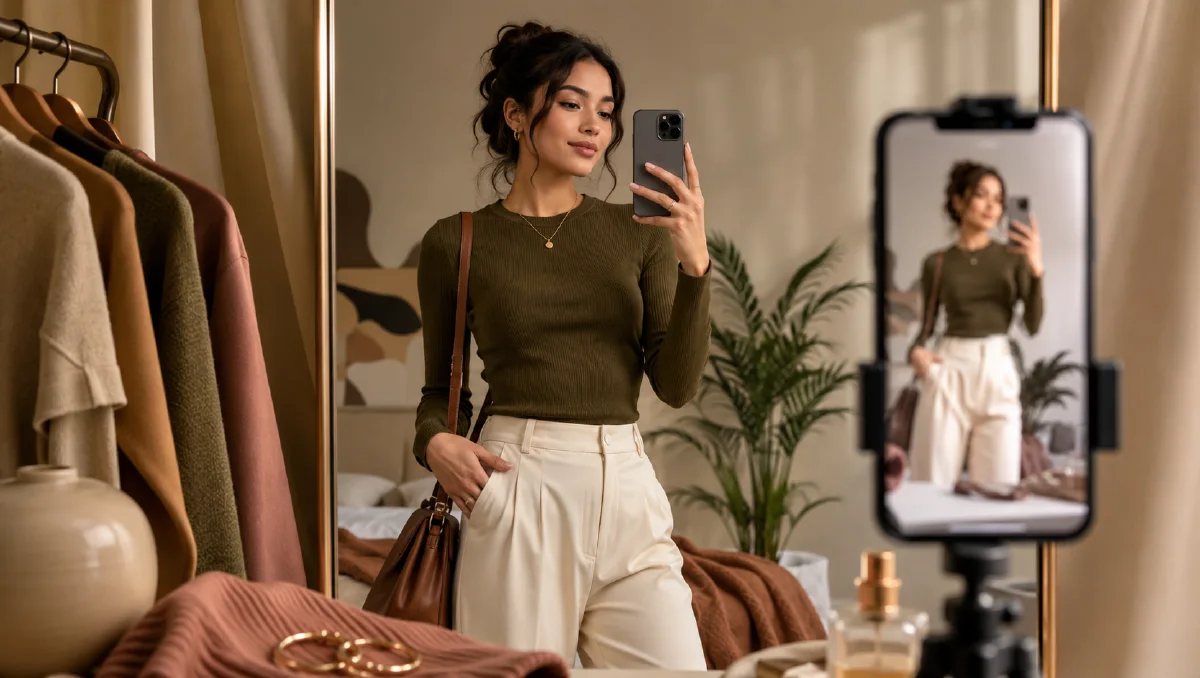
Mirror selfie UGC works because it looks casual while still showing the product clearly. A shopper can imagine the shoe, jacket, or outfit on a real person. The camera feels handheld, the pose feels unforced, and the transition from a first-person detail shot to a mirror view creates a simple story: here is how it looks on me.
This workflow turns a static product image into a short product seeding clip. It uses a styling module, a photography module, a video bridge, and a final sound/edit pass. If you want more UGC ad language, start with UGC AI video ad prompts. For similar selfie formats, see AI UGC mirror selfie video workflow and white background product image to UGC video.
What is mirror selfie product UGC?
Mirror selfie product UGC is a short video that presents a product from the buyer's point of view. It often combines two views:
| View | Purpose | Best for |
|---|---|---|
| Downward POV | Creates first-person ownership | Shoes, pants, bags, accessories |
| Mirror selfie | Shows full outfit and fit | Apparel, coordinated looks, styling bundles |
| Detail insert | Proves texture and quality | Logos, stitching, soles, fabric, hardware |
The format does not need a complex plot. The key is consistency: same model, same outfit, same room, same lighting, and a believable body position across frames.
The four-module workflow
1. Styling module: model plus product fusion
Start with a product image and a model direction. The AI needs to understand the product before it places the product on the person. Use clear reference photos: white background or clean product shots work better than busy lifestyle images.
Model prompt:
Create a relaxed short-form creator model for a casual ecommerce outfit clip.
Natural body proportions, friendly expression, realistic smartphone photo style,
soft indoor light, clean bedroom or fitting-room mirror environment, full body
visible, relaxed posture, no exaggerated fashion pose.
Product fusion prompt:
Dress the model in the product shown in the reference image. Preserve the product
color, shape, logo position, stitching, sole shape, and material texture. Make the
fit natural and believable. Keep the model face, room, lighting, and body type
consistent.
Use Naviya image generator for the base frames. If the product has strict details, reference image prompting guide will help you phrase the preservation rules.
2. Photography module: create the two anchor frames
You need at least two strong frames.
Frame A: downward POV.
First-person downward smartphone POV, standing and looking down at the shoes and
lower outfit. The product is clearly visible, natural floor texture, soft indoor
light, casual relaxed body angle, realistic phone snapshot, no text.
Frame B: mirror selfie.
Full-body mirror selfie in a clean bedroom or fitting room. The same model wears
the same outfit and product. The camera is held naturally near chest height, body
slightly angled, relaxed expression, product fully visible, realistic smartphone
photo, soft indoor light.
For shoes, a third crouching or seated frame can help show fit:
Mirror selfie angle while the model crouches slightly to show the shoe and pant
break. Same outfit, same room, natural relaxed pose, product remains accurate.
The important technical requirement is identity continuity. The body, face, outfit, and room should feel like one shoot, not separate generations.
3. Video bridge: animate between anchor frames
Use first-frame and end-frame generation when available. The video does not need dramatic action. It needs a natural motion path from standing to showing the product.
Bridge prompt:
Create a relaxed mirror selfie UGC motion. The person starts standing and looking
down at the product, then smoothly shifts into a mirror selfie pose. Movement is
casual and believable, like a short social video. Keep the same model, outfit,
room, lighting, and product details. No text, no jump cuts, no extra people.
If you want a shoe-focused clip:
The camera starts from a downward POV of the shoes, then tilts up slightly as the
model steps back toward the mirror. The model adjusts the pant cuff once and
shows the full outfit in the mirror. Natural handheld smartphone movement.
Use Naviya image-to-video for the bridge. For product-focused campaigns, Naviya AI video ads can help produce multiple hook variants.
4. Sound and edit module
Sound makes the clip feel native. Keep it light:
- A soft room tone or subtle clothing rustle.
- A small footstep or fabric adjustment.
- A low-volume trending beat for social cuts.
- Short captions only if they add buying context.
Editing rhythm:
- Open with the downward POV for instant product ownership.
- Cut or transition into the mirror view.
- Hold the full fit long enough for the product to register.
- Add one detail close-up if the product has a selling feature.
- End with a clean frame that can carry a CTA.
Prompt template for ecommerce teams
Goal: relaxed mirror selfie UGC product clip.
Product: [shoe, jacket, pants, bag, accessory].
Product rules: preserve [color, logo, shape, stitching, material].
Model: [age range, styling, body type, expression].
Room: [bedroom, fitting room, hallway mirror, studio apartment].
Frames: [downward POV], [mirror selfie], [detail close-up].
Motion: casual shift from checking the product to showing the full outfit.
Constraints: same model, same product, same room, no text, no extra props.
Common fixes
| Problem | Fix |
|---|---|
| Product changes shape | Repeat exact preservation rules and use a cleaner reference |
| Model face changes | Generate all frames from the same approved base |
| Mirror looks too staged | Ask for smartphone snapshot, relaxed posture, and slight imperfection |
| Video movement is chaotic | Use one simple action: step back, tilt phone, adjust cuff, crouch |
| Clip feels too polished | Add natural room light, handheld camera, and subtle fabric motion |
Shot variations for different products
The same mirror selfie system can flex by product category. Shoes need foot movement and floor contact. Jackets need a full-body mirror frame plus hand movement at zipper, collar, or cuff. Bags need a shoulder or cross-body angle. Pants need front, side, and waist detail.
| Product | Opening shot | Detail shot | Motion idea |
|---|---|---|---|
| Sneakers | Downward POV | Sole or lace close-up | Step forward, turn foot |
| Pants | Mirror full body | Waistband and hem | Adjust cuff, shift weight |
| Jacket | Mirror fit check | Zipper, collar, sleeve | Zip halfway, turn side |
| Bag | Mirror outfit | Strap and hardware | Lift strap, walk closer |
| Jewelry | Phone close-up | Shine and clasp | Hand moves into light |
This planning keeps the clip from becoming a generic try-on. Choose the product's most purchase-relevant proof point before generating the anchor frames.
How to brief variants
Once one clip works, make variants by changing only one variable at a time. Keep the same model and room, then test a new opening angle, a new product detail, or a slightly different caption hook. This makes performance data easier to read because you know what changed.
For example, a sneaker seller can produce three versions: one opens on downward POV, one opens on the mirror full-body frame, and one opens on a sole close-up. The product and model stay the same. The hook changes. A jacket seller can test zipper motion, hood adjustment, and side silhouette as separate first moments. This is more useful than generating ten unrelated clips.
Try it in Naviya
Upload your product to Naviya image generator, build the downward POV and mirror selfie frames, then animate them with image-to-video. If you already have a model or product reference set, start with reference-to-video to keep the final UGC clip consistent.
Final checklist
- Product is visible in the first second.
- The same model appears across all frames.
- Lighting and room details match.
- The motion feels like a real phone clip.
- There is no distracting text or unrelated product.
- The final frame clearly shows the purchase-relevant detail.