2026-06-12
AI 3D Comic Character Asset Workflow from 2D Reference Art
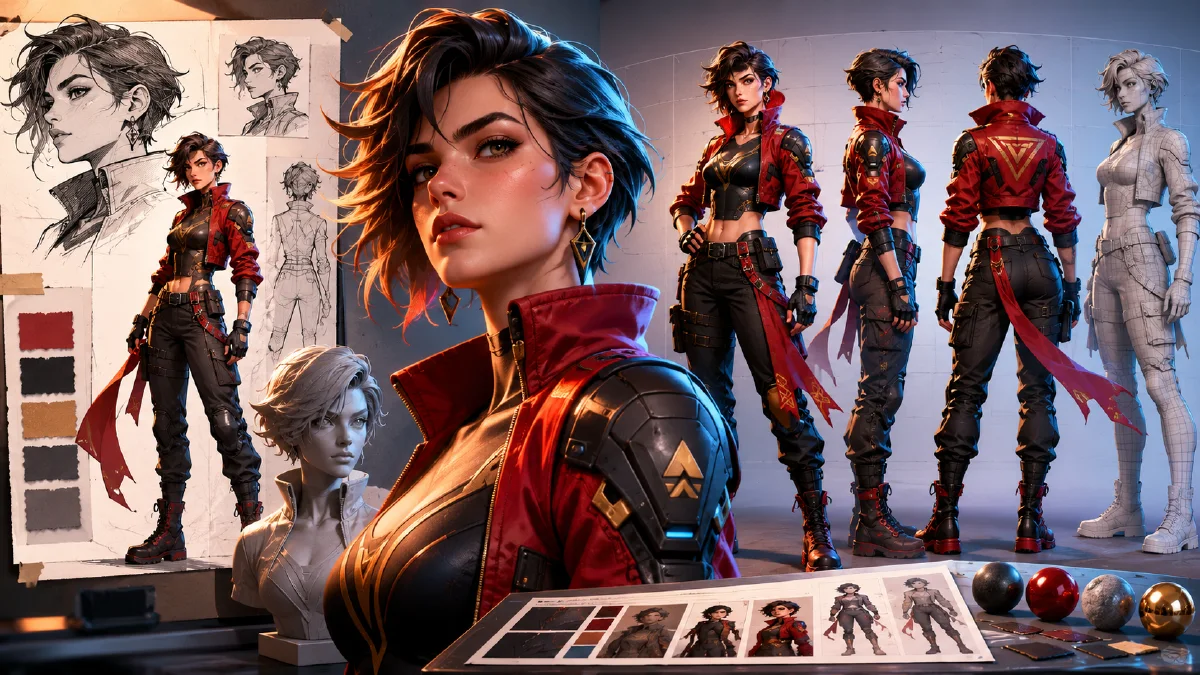
Convert 2D character art into consistent AI 3D comic assets with a bust portrait, body design, and front-side-back turnaround sheet.
Try this workflow in Naviya
Use references when identity, product shape, outfit, or style needs to stay consistent.
Try reference to video
Designing an AI 3D comic character from text alone is slow and unreliable. Language can describe a hairstyle, outfit, or personality, but it struggles to lock the exact face, expression, and spatial structure. A stronger workflow starts with a high-quality 2D character image as the visual anchor, then converts that design into a standardized 3D asset: a bust portrait plus a front, side, and back full-body turnaround.
This workflow is useful for serialized AI comics, animated short concepts, virtual character development, game previsualization, and image-to-video character references. Use Naviya AI Image Generator to build the asset sheet, then use Reference to Video or AI Video Generator to animate approved designs. For related workflows, read multi-angle model references, reference image prompting guide, and consistent AI video character guide.
Why start from 2D art?
A 2D character illustration acts as an aesthetic baseline. It gives the AI a face, hair design, mood, and visual taste to preserve. Without that anchor, the system often invents a generic 3D person that only loosely matches the script.
The 2D-to-3D workflow solves three problems:
- It preserves the strongest aesthetic decisions from the illustration.
- It creates a clean 3D bust for face and material evaluation.
- It creates a turnaround sheet that can guide later motion and scene generation.
The goal is not to copy every line mechanically. The goal is to rebuild the character as a 3D form while keeping the identity readable.
Step 1: choose a strong 2D visual anchor
Pick one character image with a clear face, distinctive hairstyle, and styling that fits the story. Avoid images where the face is tiny, heavily hidden, or surrounded by too many props. The best reference is visually attractive but simple enough to convert into a clean model sheet.
Selection checklist:
| Check | Why it matters |
|---|---|
| Clear face | needed for identity preservation |
| Strong hairstyle | gives instant recognition |
| Readable outfit | helps later body design |
| Controlled lighting | prevents strange material conversion |
| One character | avoids accidental blending |
| Good taste fit | saves prompt fighting later |
If the final character needs a different outfit, use the first image for the head and expression, then provide a second image or text description for the clothing.
Step 2: generate the 3D bust
The bust is the face approval stage. It should show the head, shoulders, hair, skin, eyes, and clothing hints clearly. Use a white or simple background so you can evaluate shape without scene noise.
Bust prompt:
A detailed 3D bust portrait of a [female/male] character, rendered
in a premium serialized animation style, based on the provided 2D
reference image. Clean head-and-shoulders composition. Accurately
adapt and enhance the facial structure, eye shape, expression,
hairstyle, hair color, hair cut, and clothing elements from the
reference. Intricate details, natural skin texture, bright eyes,
smooth geometry, cinematic quality, soft studio lighting, pure white
background, flawless generation.
Review the bust before moving on. If the face is wrong, do not build the turnaround yet. Regenerate until the eyes, jaw, expression, and hair feel locked.
Step 3: add optional character setting
Text still matters. After the bust looks right, add short setting notes for body proportion, outfit tone, and story role. Keep this concise.
Examples:
Body proportion: stylized heroic proportions, long legs, elegant posture.
Outfit: layered urban fantasy jacket, fitted trousers, utility belt,
ankle boots, small metallic hair accessory.
Personality: calm, focused, quietly powerful, not smiling.
If you do not specify body proportion, the result may default to an ordinary realistic figure. That can be fine for grounded stories, but stylized comic assets often need more deliberate proportions.
Step 4: generate the asset presentation sheet
The asset sheet should combine the approved bust with a full-body turnaround. It needs alignment, consistent scale, and a plain background. This is not a poster. It is a production reference.
Turnaround prompt:
A professional high-resolution 3D character asset presentation sheet
in a 16:9 aspect ratio. The composition is horizontally divided into
two main sections.

Left section: a detailed close-up 3D bust portrait of the character.
The facial features, bone structure, expression, hairstyle, and head
accessories must strictly match Reference Image 1.

Right section: the same character as a full-body 3D model in a standard
A-pose, arranged in a precise three-view turnaround: front view,
side view, and back view. Body proportions, clothing design, fabric
layers, shoes, and outfit styling must follow Reference Image 2 or the
provided outfit description. The head from the bust and the full-body
views must be consistent across all views.

Soft uniform studio lighting, pure white background, flawless geometry,
all full-body models aligned at the same scale and height, cinematic
3D render quality.
What the final asset should contain
| Area | Purpose |
|---|---|
| Left bust | checks face, hair, expression, skin, and material |
| Front view | establishes main outfit and silhouette |
| Side view | reveals body depth, profile, accessories, and hair volume |
| Back view | completes clothing, hair, and prop continuity |
| White background | keeps the sheet usable as a reference |
This type of asset can guide later image generation, scene placement, and video creation. The turnaround makes it easier to ask for the character from different camera angles without reinventing the design.
Step 5: use the asset in video
Once the sheet is approved, crop the bust or full-body view as needed and use it as a reference for Reference to Video. Begin with low-risk motion:
- slow head turn;
- natural blink;
- subtle breathing;
- hair moving gently;
- camera push-in;
- cloak or jacket moving in wind.
Avoid asking for running, fighting, and complex choreography until the face and outfit survive simple motion.
Try it in Naviya
Upload the 2D character image to Naviya AI Image Generator and generate a 3D bust first. After approving the face, build the 16:9 turnaround sheet. Use the strongest bust or full-body crop in Reference to Video for your first animated character test.
Reuse rules for a character library
If you are building multiple characters for the same story, keep asset sheets consistent. Use the same white background, the same 16:9 layout, the same A-pose, and the same lighting language. Name each character by role and version, such as "lead explorer v03" or "rival mechanic v02." The goal is to make every sheet usable in the same production folder. When later prompts ask for group scenes, consistent asset sheets reduce design drift because each character has already been standardized.
For recurring casts, create one approved bust, one approved full-body sheet, and one approved expression variation before generating complex scenes.
Keep props separate at first. Weapons, bags, wings, and floating accessories make the first sheet harder to align. Add them after the body, head, and outfit are already stable.
Asset QA checklist
Before using the character in production, confirm:
- The bust and turnaround show the same person.
- Front, side, and back views share the same height and proportions.
- Hair shape and accessories do not change between views.
- Outfit layers are consistent and physically believable.
- Hands, shoes, and clothing edges are clean enough for reference use.
- The background is simple and does not contaminate later prompts.
This workflow turns a single attractive illustration into a usable 3D character system. Once the system exists, every later prompt becomes easier because the AI has something concrete to preserve.