2026-06-12
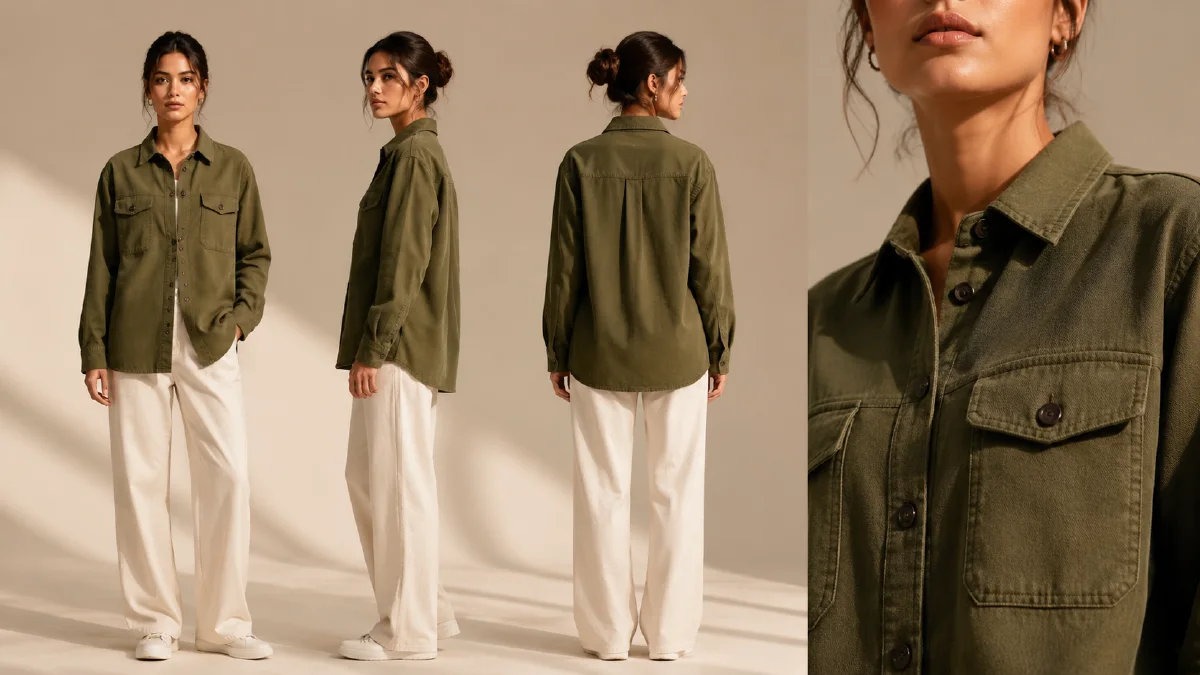
Multi-Angle Model References for AI Apparel Photos
Create multi-angle AI apparel model photos with consistent identity, garment details, and ecommerce-friendly front, side, back, and close-up views.
Try this workflow in Naviya
Use references when identity, product shape, outfit, or style needs to stay consistent.
Try reference to video
Multi-angle model references help apparel sellers create a complete product story without reshooting every view. A single front-facing model image is rarely enough for clothing ecommerce. Shoppers want to understand the front, back, side profile, length, sleeve shape, collar, zipper, pocket, fabric texture, and how the garment sits on a body. AI can help create that set, but only if the workflow is designed around consistency.
The goal is not to generate eight unrelated fashion images. The goal is one model, one garment, one lighting setup, and several useful views. That requires a model reference, a product reference, and view-specific prompts that preserve the same identity and clothing details.
Use Naviya AI Image Generator to create or refine the still image set. When the front image is already approved, use it as the identity and styling anchor for additional views.
Start from one approved hero view
Choose the strongest image as the hero reference. It should show the model face, hairstyle, garment, lighting, and background clearly. This image becomes the visual contract for the rest of the set.
Document the contract:
Same male model, same curly hairstyle, same face, same skin tone, same body proportion.
Same brown zip jacket, same zipper position, same logo placement, same fabric texture.
Same clean white ecommerce studio background, same soft lighting, same lens feel.
This may sound repetitive, but it is useful. Consistency language reduces the chance that the model changes face, body type, garment color, or studio setup between angles.
The reference image prompting guide is especially relevant for this workflow because each reference needs a role: one for identity, one for garment detail, and sometimes one for lighting.
Use view prompts, not generic variants
Do not ask for "more angles" and hope the model chooses ecommerce-friendly views. Name each angle clearly.
Core angle set:
| View | Ecommerce purpose |
|---|---|
| Full-body front | Primary fit, length, silhouette |
| Full-body back | rear seams, hood, back print, hem |
| Left side profile | garment thickness and drape |
| Right side profile | symmetry and side pocket view |
| Upper-body close-up | collar, zipper, logo, sleeve |
| Macro detail | texture, stitching, pocket, hardware |
Each view should keep the camera simple. A dramatic low angle may look stylish but distort garment length. A strong wide-angle lens may make sleeves, legs, or torso proportions unreliable.
Prompt examples for consistent angles
Front view:
Ultra realistic ecommerce apparel photo.
Same model as reference, same curly hairstyle, same face and body proportions.
Wearing the same brown zip jacket from the garment reference, zipper centered, logo clearly visible, fabric texture preserved.
Full-body front view, standing straight, hands relaxed at sides.
Clean white studio background, soft even lighting, sharp focus.
Do not change garment color, logo placement, hairstyle, body shape, or background.
Back view:
Create a full-body back view of the same model wearing the same brown zip jacket.
Preserve hairstyle, body proportions, jacket color, sleeve length, hem length, fabric texture, and studio lighting.
Model stands naturally with arms relaxed, back facing camera, no twist, no extra accessories.
White ecommerce background, realistic catalog photography.
Side view:
Create a full-body left side profile view of the same model and same jacket.
Show garment thickness, sleeve shape, hem, and relaxed fit.
Keep the model upright, hands relaxed, white studio background, same lighting and lens.
No new clothing layers, no changed logo, no altered body proportions.
Detail crop:
Create an upper-body close-up of the same jacket on the same model.
Focus on zipper, collar, logo placement, pocket edge, and fabric texture.
Keep lighting soft and accurate. Do not invent text, patches, extra hardware, or new seams.
These prompts are plain because ecommerce angles need clarity more than poetry.
Keep garment references close
If the garment has a logo, zipper, pocket, print, or special collar, include a detail reference. A front view alone may not give the model enough information for back and macro shots. The more specific the product, the more important the reference set becomes.
For patterned clothing, consistency is harder. Stripes may shift, plaids may break, and logos may warp. Generate fewer images per pass and check each one before expanding the set. A small accurate set is better than a large inconsistent one.
Use the same lighting and background
Multi-angle images should feel like they came from one shoot. If the front view uses a white studio background, do not let the side view become a gray room and the detail crop become a dark editorial shot. Repeat the same setting:
clean white ecommerce studio background, soft even lighting, realistic shadow under feet, high resolution, sharp focus
This helps product pages feel coherent. It also makes image grids cleaner on marketplaces and independent stores.
Add motion only after the still set works
A complete multi-angle still set can feed video. The front view can become a slow turn. The detail crop can become a zipper highlight. The side profile can become a subtle fabric movement. Use Image to Video when the still is already accurate.
If the brand needs paid creative, approved model images can be turned into AI Video Ads. Keep ad motion built from the same visual contract so the campaign does not look like a different model wearing a different product.
For product-page motion planning, the product image to video guide is a practical reference. It reinforces a useful rule: never ask video to fix a still image that is not already approved.
How to name and reuse the angle library
A multi-angle set becomes much more valuable when every image has a clear role. Do not save files as random variants. Name them by view and use case so the team can reuse them across ecommerce, ads, and motion.
Use a simple naming pattern:
product-fit-view-purpose
oversized-hoodie-front-catalog
oversized-hoodie-side-fit
oversized-hoodie-back-detail
oversized-hoodie-three-quarter-ad
oversized-hoodie-macro-fabric
Then build prompts from the same labels. The front catalog view should protect symmetry and garment shape. The side fit view should show length, sleeve volume, and silhouette. The back detail view should protect hood, yoke, seam, or print placement. The macro frame should not invent new fabric; it should enlarge what already exists.
Once the library works, choose only the strongest two or three frames for motion. A complete angle library does not mean every frame needs to become a video. Use Reference to Video when model and outfit consistency matter, and use Image to Video for simpler camera moves. For campaign edits, connect the set to sportswear style AI fashion video or a broader AI fashion product video.
Try it in Naviya
In Naviya, upload your approved front model photo and garment reference, then generate one angle at a time. Save the best front, back, side, and close-up views as a consistent set before experimenting with lifestyle backgrounds or video.
QA the angle set
Review the images side by side:
- Does the model look like the same person?
- Does the garment color match across views?
- Does the logo stay in the correct location?
- Does sleeve length stay consistent?
- Does the hem hit the same body point?
- Does the background and lighting match?
- Do hands and feet look natural?
- Does the detail crop show real product features rather than invented ones?
Multi-angle model references make AI apparel production more useful because they create a catalog system, not just isolated images. Keep the identity stable, name each view, protect garment details, and only then turn the set into motion or campaign creative.