2026-06-12
Sportswear-Style AI Fashion Video Workflow
Create sportswear-style fashion videos with product-focused model prompts, multi-angle stills, close-ups, motion prompts, and beat-based editing.
Try this workflow in Naviya
Turn a product, hook, or campaign idea into short social-ready ad concepts.
Create video ad variants
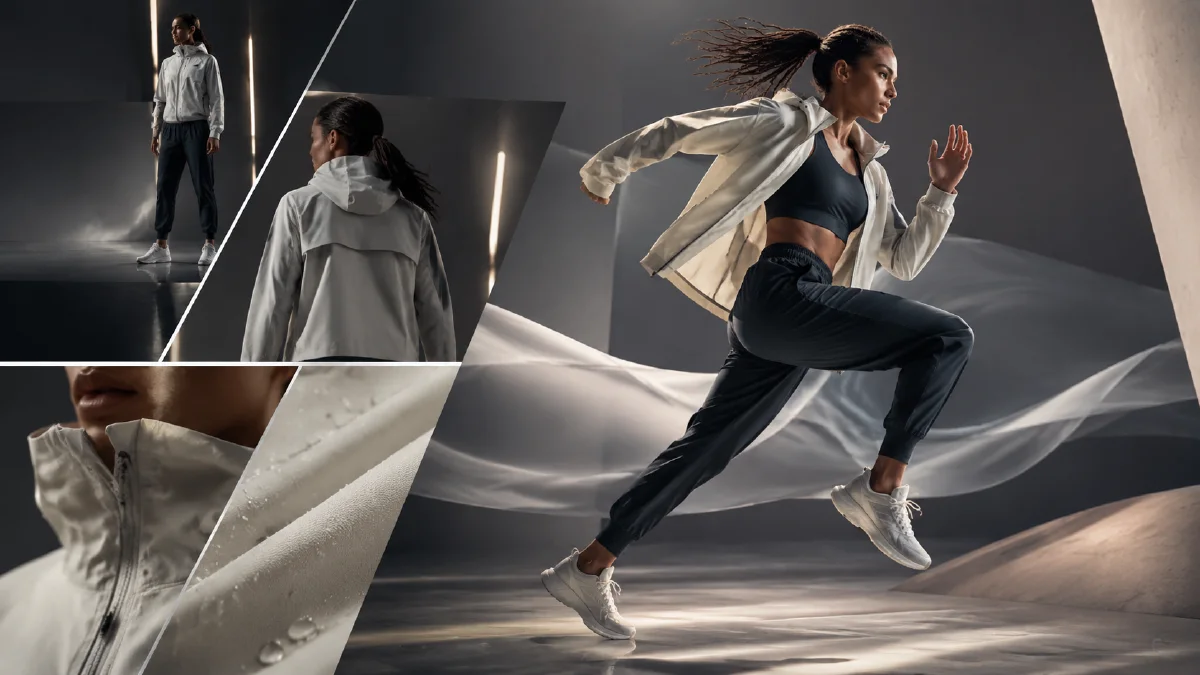
Sportswear-style fashion videos need clean product detail and movement. The viewer should see the garment, understand the fit, and feel the brand energy without the visual becoming a generic gym montage. AI can help generate model photos, close-ups, multi-angle stills, and short video clips, but the prompt must protect product details: collar, hem, logo area if owned, fabric, waistband, and silhouette.
This guide shows how to create a sportswear-style AI fashion video for concept campaigns, ecommerce launches, and social ads. It does not imply affiliation with any real sportswear company. Use it with AI fashion product video workflow, AI apparel model workflow, Naviya's AI Image Generator, and Reference to Video.
Start with a product-focused model prompt
The first still should establish model, outfit, pose, and lighting:
Full-body sportswear-style fashion photograph of an adult model with a high ponytail.
The model wears a white short zip-up sweatshirt, matching sports bra, and tapered sweatpants.
She pulls the collar of the sweatshirt with one hand and keeps the other hand in a pocket.
Pure white minimalist indoor background, bright soft lighting, sporty and fashionable mood.
Medium shot that shows the full outfit, clear garment shape and fabric, high-quality realistic photography, no text, no third-party logos.
This prompt uses a specific outfit, pose, background, and product hierarchy. It avoids vague words like "cool athletic vibe" without visual detail.
The six-part apparel prompt
Use this structure for every still:
| Part | What to specify |
|---|---|
| Subject/detail | Model, hairstyle, garment, action, visible product area. |
| Environment | White studio, black studio, gym corridor, city wall, outdoor court. |
| Style | Sporty, fashion editorial, clean campaign, energetic, premium. |
| Composition | Full body, medium shot, shoulder close-up, collar macro. |
| Color | Product color plus one neutral background tone. |
| Rendering | High quality, realistic fabric texture, sharp detail. |
Sportswear visuals are stronger when the palette is controlled. Product color plus white, black, gray, or one accent is usually enough.
Generate multiple angles
After the hero still, create options:
| Angle | Use |
|---|---|
| Front full-body | Product page and hero ad. |
| Side walking | Movement and fit. |
| Three-quarter turn | Shape and attitude. |
| Collar close-up | Zipper, neckline, layered styling. |
| Sleeve close-up | Fabric, cuff, logo area if owned. |
| Lower-body crop | Pants fit, hem, sneakers. |
Prompt for angle expansion:
Create multiple sportswear campaign stills using the same adult model, same white outfit, same minimalist studio style.
Vary composition, camera angle, model action, background tone, and lighting while keeping the outfit accurate.
Include full-body, side view, three-quarter turn, collar close-up, and fabric detail shots.
No third-party logos, no text, realistic fashion photography.
For a close-up:
Extreme close-up of the sportswear collar and shoulder area.
Only the lower half of the model's face is visible.
Show zipper, collar shape, fabric texture, stitching, and soft studio light.
Clean minimal background, high-quality realistic fashion photography.
Close-ups often need stronger crop instructions. If the output is not close enough, use the best still as a reference and ask for a tighter crop.
Animate with restrained movement
Sportswear motion should show garment behavior. Use:
- Collar pull.
- Pocket pose shift.
- Slow step toward camera.
- Side turn.
- Fabric sway.
- Hair movement.
- Camera push or orbit.
Prompt:
Short sportswear fashion video from the uploaded image.
The model gently pulls the collar, shifts posture, and turns slightly toward the camera.
Fabric moves naturally, soft studio lighting, clean background, product-focused fashion ad mood.
Keep outfit color, collar, zipper, sleeve length, pants shape, and model identity consistent.
For close-up motion:
Macro sportswear detail video from the uploaded collar close-up.
Camera slowly pushes in, fabric texture and zipper catch soft light, the model's hand lightly adjusts the collar.
Keep garment detail stable and realistic, no text.
Edit to music
Sportswear-style videos can use beat-based editing, but keep the product readable:
| Time | Shot |
|---|---|
| 0-2s | Hero pose or collar pull. |
| 2-4s | Close-up of collar or fabric. |
| 4-6s | Side walking or posture shift. |
| 6-8s | Three-quarter turn. |
| 8-10s | Final full outfit frame. |
Cut on beat, but do not make every shot too short. If viewers cannot understand the garment, the ad becomes a mood clip rather than product marketing.
Detail shots that sell the garment
Use close-ups to answer practical questions. A collar shot can show zipper quality and layering. A sleeve shot can show fabric weight and cuff shape. A lower-body crop can show whether pants taper, stack, or sit cleanly over shoes. These details make a sportswear video useful for shoppers, not only attractive for a feed.
When generating detail shots, keep the camera close but not abstract. If viewers cannot identify the garment part, the close-up is too tight. The best detail frames still connect to the full outfit they came from.
QA checklist
- Outfit remains the same in every shot.
- Product details are sharp enough for mobile.
- Model movement is natural and not exaggerated.
- No real sportswear marks appear unless they belong to your product and are approved.
- Close-ups show useful details, not random crops.
- The video has a clear first-frame hook.
- Final frame leaves room for product name or CTA.
Campaign structure for sportswear drops
Sportswear videos need to sell both function and style. A useful drop campaign can be built from a small sequence rather than one oversized prompt.
Use this structure:
| Clip | Purpose | Motion |
|---|---|---|
| Hero fit | Show the full outfit on body. | slow push-in or model turn |
| Movement proof | Show stretch, breathability, or layering. | lunge, jog start, arm lift, warmup step |
| Detail crop | Sell fabric, seam, zipper, or pocket. | light sweep or small hand gesture |
| Lifestyle scene | Show the buyer occasion. | walk into gym, outdoor path, studio mirror |
| End frame | Make the product memorable. | locked product pose with caption-safe space |
The sequence should not imitate a full workout shoot. It should show enough movement to make the clothing credible while keeping the garment readable. If a pose twists the logo area or changes sleeve length, choose a calmer gesture. If the model looks athletic but the product disappears, the ad is failing as ecommerce media.
Start with stills in AI Image Generator, use multi-angle model references to preserve the outfit, then animate the best frames with Reference to Video. For paid social, cut the strongest first second into AI Video Ads and test performance without changing the outfit description.
Review the final cut at phone size. Sportswear details that look clear on a desktop can disappear in a vertical feed. The viewer should understand fit, activity, and product type before reading the caption. If the edit needs a long explanation, simplify the scene or move the detail shot earlier.
For collection launches, make one version with a full-body opener and another with a detail-first opener. The full-body cut sells silhouette and styling. The detail-first cut sells fabric and construction. Comparing both gives the team a clearer read on whether buyers respond to performance cues or outfit appeal.
Try it in Naviya
Create the hero still and detail stills in Naviya's AI Image Generator. Use Reference to Video to preserve model and outfit consistency, then build a social cut with AI Video Ads. For small detail motions, test the best still in Image to Video.