2026-06-12
AI Lookbook From a Single Product Image
Build a high-quality AI lookbook from one product photo with model generation, outfit planning, scene selection, and campaign image QA.
Try this workflow in Naviya
Turn a product, hook, or campaign idea into short social-ready ad concepts.
Create video ad variants
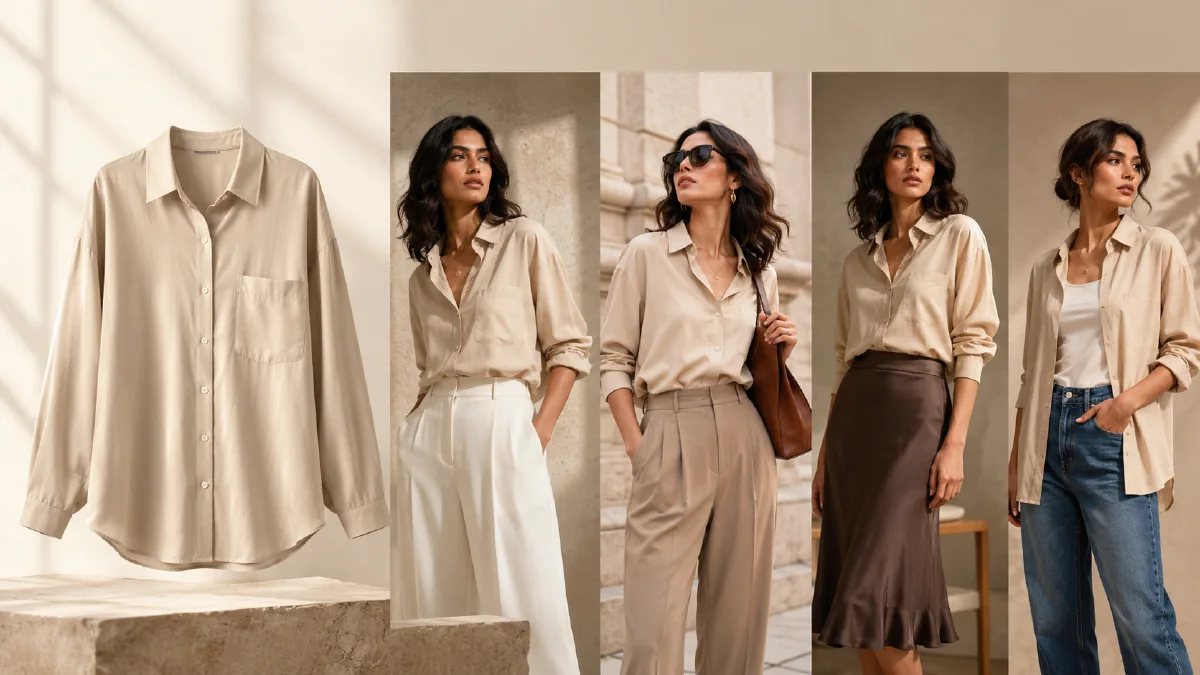
An AI lookbook from a single product image turns one garment photo into a set of styled fashion images. The workflow separates the shoot into three modules: model, outfit, and environment. That structure makes the output more useful than a random set of pretty images because each look has a role.
For fashion brands, this helps solve a common problem. Product images are often available before full campaign photography. A single item may need model shots, outfit ideas, social images, and landing-page visuals across several audience segments. AI can generate a first lookbook direction quickly when the product image is clean and the planning is structured.
Use AI Image Generator for still images, Image to Video for motion clips, and AI Video Ads for lookbook-derived ads. Related guides include AI model product scene automation, ecommerce AI model photos, batch fashion ecommerce image workflow, and AI flat-lay outfit poster workflow.
Definition
A lookbook is a curated set of fashion images that shows how a product can be worn, styled, and placed in a lifestyle. An AI lookbook workflow uses the product image as the anchor, then generates models, outfits, and scenes around it.
The key rule: the product must stay accurate. The scene can change. The model can change. The styling can change. The garment's core design should not.
Stage 1: Create the model direction
Build a model profile that fits the brand and buyer.
Model prompt:
Create a fashion model reference for a lookbook.
Age range: [age].
Gender presentation: [presentation].
Body type: [fit and posture].
Skin tone: [description].
Hair: [style].
Facial features: natural, realistic, editorial.
Attitude: [calm, confident, relaxed, energetic].
Brand mood: [minimal, street, resort, premium, romantic].
Generate several models and choose one or two. A consistent model helps the lookbook feel coherent, but alternate models can be useful for audience testing.
Stage 2: Upload the product and plan outfits
Upload the product image and ask AI to style around it. If the product is a shirt, plan pants, shoes, and accessories. If it is a skirt, plan top, jacket, shoes, and bag. If it is outerwear, decide whether the base layer should be visible.
Outfit planning prompt:
Act as a fashion stylist.
Analyze the uploaded garment and create five outfit concepts.
For each concept, include: style name, matching items, color palette, shoes, accessories, season, and occasion.
Keep the uploaded garment as the hero item.
Example concepts:
- Modern minimalist workwear.
- Weekend city walk.
- Soft resort evening.
- Street casual layer.
- Gallery opening black-and-cream look.
Choose the concepts that fit the brand, not only the ones that look novel.
Stage 3: Plan environments
Environment turns outfit into lifestyle. A lookbook should feel like a series, so choose related scenes.
| Product mood | Scene ideas |
|---|---|
| Minimal workwear | concrete studio, gallery, bright office |
| Streetwear | night street, stairwell, parking rooftop |
| Resort | hotel terrace, beach walkway, linen interior |
| Romantic | old apartment, garden, warm cafe |
| Outdoor | trail, cabin, foggy road, mountain town |
Scene prompt:
Create five lookbook scene concepts for this outfit.
Keep the environment realistic and fashion editorial.
Each scene should show the garment clearly.
Include camera angle, lighting, pose, and crop.
Stage 4: Generate the final lookbook images
Final image prompt:
Create a fashion lookbook image.
Model: [chosen model profile].
Garment: use the uploaded product image as the hero garment and preserve details.
Outfit: [chosen styling concept].
Scene: [chosen environment].
Pose: natural editorial pose that shows fit and silhouette.
Camera: [full-body, medium, detail, walking shot].
Lighting: [soft daylight, flash, golden hour, studio].
Style: polished lookbook photography, realistic, premium.
Constraints: accurate garment color, silhouette, fabric, seams, and pattern. Natural hands. No fake logos or text.
Create a balanced lookbook:
| Image | Purpose |
|---|---|
| Look 1 full-body | Shows complete outfit |
| Look 2 full-body | Alternate styling |
| Medium crop | Product page or social |
| Detail crop | Fabric and construction |
| Lifestyle wide | Banner or campaign image |
Use cases by channel
Different channels need different lookbook crops:
| Channel | Best image |
|---|---|
| Product page | Full-body fit shot plus detail crop |
| Instagram carousel | Alternating full-body, lifestyle, and detail images |
| Wide lifestyle image with copy space | |
| Paid social | Strongest model shot with clear product visibility |
| Wholesale deck | Clean look set with consistent styling |
Planning these crops early prevents the lookbook from becoming beautiful but hard to use.
Add motion
Animate the best stills with restrained movement:
Animate this lookbook image into a 5 second fashion clip.
Camera: slow push-in or gentle side track.
Motion: model shifts weight naturally, fabric moves slightly, light changes softly.
Constraints: preserve garment design, model identity, and scene.
Use Image to Video for editorial motion and AI Video Ads when turning the lookbook into paid creative.
Make the lookbook shoppable
A lookbook should inspire, but it also has to answer practical buying questions. Build the sequence so every image has a job. The opener should sell the mood. The second image should show full fit. The third can show styling context. The fourth should reveal fabric, cut, or construction. The final image should be clean enough for a product card, email banner, or social carousel cover.
When starting from one product image, do not change too many styling variables at once. If the garment is a black trench, test one city look, one studio look, and one travel look before trying unusual props or extreme lighting. Keep shoes, accessories, and hair styling consistent enough that the collection feels intentional. If the garment changes color or length between images, prioritize correction over more variety.
For teams, a useful approval note is simple: keep, revise, or reject. Keep means product and mood both work. Revise means the concept is good but a detail failed. Reject means the image does not represent the item honestly.
When the lookbook supports paid creative, mark one image as the conversion frame. It should show the product clearly, leave room for copy, and still carry the same styling language as the editorial frames. This prevents the campaign from looking inspiring in the carousel but unclear in the ad.
For wholesale or buyer decks, add one neutral image that removes styling drama. Buyers often need a clean view before they respond to mood.
Try it in Naviya
Upload one garment image to AI Image Generator. Generate a model, create five styling concepts, choose three scenes, and produce a five-image lookbook. Then animate the best full-body image with Image to Video.
Lookbook QA checklist
- Product color and silhouette stay accurate.
- Styling supports the product instead of hiding it.
- Model and environment feel consistent.
- At least one image clearly shows full fit.
- At least one image shows fabric or construction detail.
- Images crop cleanly for social and ecommerce.
- No invented brand marks or unreadable text appear.
Save the rejected images too, but label why they failed. Common reasons include wrong garment color, hidden hem, inconsistent model, or scene mismatch. Those notes make the next prompt more precise.
A strong AI lookbook is not just a set of fashion images. It is a product story: who wears the item, how it is styled, where it belongs, and why the buyer can imagine it in their life.