2026-06-12
AI Fashion Product Video Workflow for Apparel Ads
Build AI fashion product videos with consistent first frames, fabric detail, model shots, macro texture, and ad-ready editing rhythm.
Try this workflow in Naviya
Use references when identity, product shape, outfit, or style needs to stay consistent.
Try reference to video
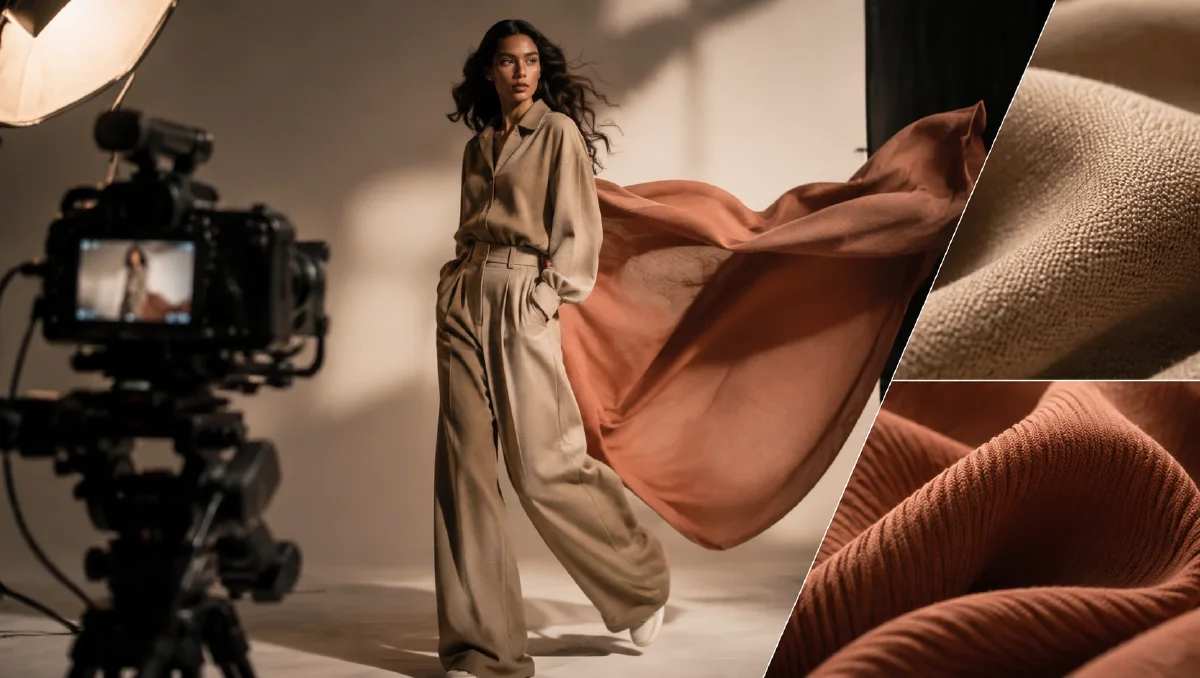
Fashion video works when viewers can feel the fabric, understand the silhouette, and imagine the garment in motion. AI can create those moments quickly, but apparel ads need more structure than a generic "model wearing a shirt" prompt. A useful fashion video combines macro texture, body movement, styling context, and clean product focus. The workflow below is designed for T-shirts, casualwear, knitwear, and apparel drops where the material story matters as much as the model shot.
Start with Naviya AI Video Generator for concept-to-video exploration. Use Naviya Image to Video when you already have a garment render, lookbook still, or product photo. Build campaign-ready variants in Naviya AI Video Ads. For deeper prompting, pair this with the product image to video guide and AI video camera movement prompts.
Give the garment a visual thesis
Apparel ads often fail because they only show that a garment exists. A better video gives the garment a visual thesis: "soft cotton that breathes," "minimal shirt with sculptural movement," "outdoor shell engineered for weather," or "streetwear piece with confident volume." That thesis determines your shots.
For a cotton T-shirt, the visual thesis might be softness and breathability. That suggests close-ups of cotton fibers, gentle light, natural movement, and relaxed styling. For a technical jacket, the thesis might be protection and performance. That suggests water droplets, layered construction, cold light, and controlled studio motion.
Write the thesis before making frames:
This apparel ad presents a pure cotton T-shirt as soft, breathable, clean, and easy to wear in daily life.
Now each shot can do one job in support of that idea.
Build a four-part fashion sequence
A balanced apparel video can use four shot types:
| Shot type | Purpose | Good motion |
|---|---|---|
| Macro material | Make the fabric tactile | Light particles across fibers |
| Model wearing garment | Show fit and movement | Slow turn, walk, arm movement |
| Detail close-up | Prove construction | Seam, collar, sleeve, hem |
| Full look | Show styling and occasion | Pull-back or orbit |
Do not skip the macro material shot. It gives the viewer a reason to believe the product claim. A cotton shirt is not just white cloth; it has fibers, weave, softness, and movement. A good macro shot turns those qualities into a visual argument.
Generate the core still frames
Create still frames before animation. For the macro shot, ask for the material surface clearly, with no model and no clutter. For the model shot, focus on natural posture and believable garment drape. For the detail shot, keep the camera close enough to show construction without making the garment abstract.
Macro prompt:
Create a macro fashion product keyframe for a pure cotton T-shirt.
Scene: close view of soft cotton fibers and woven threads.
Lighting: warm soft light, clean pale background, gentle highlights.
Mood: breathable, comfortable, premium everyday apparel.
Composition: fabric texture fills the frame, depth of field, no text.
Constraints: realistic fiber structure, no plastic shine, no stains, no extra objects.
Model prompt:
Create a fashion ad keyframe for a model wearing a clean cotton T-shirt.
Scene: minimal studio with soft natural light.
Model: relaxed posture, natural expression, casual styling.
Garment: T-shirt drapes naturally, collar and sleeves visible, clean fit.
Mood: easy, breathable, modern.
Constraints: realistic hands, natural fabric folds, no distorted body proportions.
The best first frames look almost ready for a lookbook. Video should add life, not rescue a weak image.
Animate fabric, not chaos
For apparel, motion should reveal the garment. Avoid overactive camera moves that hide fit and detail. A slow push-in across cotton texture, a gentle breeze lifting the hem, or a model turning slightly can communicate more than a dramatic transformation.
Image-to-video prompt:
Animate this apparel keyframe into a 6 second fashion product video.
Camera: slow push-in from waist to collar.
Motion: fabric moves subtly with the model's breathing and a light studio breeze.
Lighting: soft highlight moves across the cotton surface.
Mood: clean, breathable, premium daily wear.
Constraints: preserve garment shape, body proportions, collar, sleeve length, and fabric texture.
Macro texture prompt:
Animate this cotton macro image into a 5 second material detail clip.
Camera: very slow glide across the woven surface.
Motion: tiny light particles pass through fiber gaps, showing breathability.
Lighting: warm and soft, not glossy.
Constraints: keep the fabric realistic, no liquid, no artificial plastic texture.
Use the macro clip as a transition or opener. It sets a tactile mood before the model shot.
Edit for fashion rhythm
Fashion ads need rhythm, but the rhythm should not destroy product comprehension. A 12 second version might open with a half-second macro flash, move to the model, cut to sleeve or collar detail, then finish with a full look. A 6 second version can use just three shots: texture, model turn, final hero frame.
Keep color consistent across shots. If the macro scene is warm and the model scene is cold, the garment may feel like two different products. Use the same lighting language, even when the camera angle changes. If you need a bolder version for social ads, change pacing and opening motion while keeping the garment color and fabric behavior stable.
Avoid common apparel AI problems
Check the garment edges in every clip. Sleeves may lengthen, collars may merge with necklines, and seams may drift. Hands are another risk when the model touches the product. If a hand adjusts the hem or sleeve, keep the action small and natural. Full-body walking shots can be useful, but they require more review because legs, feet, and garment drape can change between frames.
Also avoid fake brand marks or unreadable slogans on the shirt. If the campaign needs logo or copy, add it as a real design element in the still frame or in post-production, not as generated pseudo-text.
Prompt blocks for fit and fabric
Fashion video prompts improve when fit and fabric are handled as separate blocks. Fit tells the model the garment structure. Fabric tells the model how the garment should move.
Use this compact pattern:
Garment fit: [regular, oversized, cropped, tailored], [collar], [sleeve], [hem], [length], [closure].
Fabric behavior: [light cotton, satin, denim, technical knit], moves with [small breeze, walking motion, arm lift], no melting seams.
Styling context: [streetwear, resort, studio lookbook, gym warmup], simple accessories only.
Camera and motion: [medium shot, slow orbit, gentle push-in], preserve garment shape and model identity.
If the output loses the product, reduce the styling context first. Many apparel prompts fail because the scene, pose, accessories, and motion all compete with the garment. For product-page work, keep the model nearly still and let fabric texture do the selling. For paid social, make the first second stronger but protect the garment blocks exactly.
Teams can use the same stills in adjacent workflows: create the stable hero frame in AI Image Generator, build extra views with multi-angle model references, then animate the approved frame with Reference to Video. The prompt should feel boring in the right places: same garment, same fit, same fabric rules, new camera or scene only when needed.
Try it in Naviya
In Naviya, create one material-first frame and one model-first frame. Animate both with simple movement, then cut them together into a 6 to 10 second apparel ad. Use the same garment description in every prompt: color, fit, sleeve shape, collar, and fabric. If the product is a shirt, make the collar and sleeve the protected details. If it is outerwear, protect the zipper, hood, pocket shape, and fabric surface.
Once the base ad works, create variants by changing the first second: macro texture opener, model movement opener, or final-look opener. This gives you social testing options while preserving the same apparel identity.
Final checklist
Before publishing, ask whether the viewer can understand the material, fit, and mood without reading the caption. If the fabric feels real, the garment stays stable, the model looks natural, and the video has a clear visual thesis, the ad is ready to support an apparel launch or product page.