2026-06-12
AI Lighting Prompts: Direction, Contrast, and Color Temperature
Write better AI lighting prompts by defining light direction, contrast ratio, color temperature, shadow falloff, and motivated light sources.
Try this workflow in Naviya
Use the guide to shape a still image, then keep it as a first frame or campaign asset.
Open the studio
AI lighting prompts often fail because they rely on broad adjectives: cinematic, beautiful, soft, dramatic, moody. These words can help, but they do not tell the model where the light comes from, what it touches, or how shadow behaves.
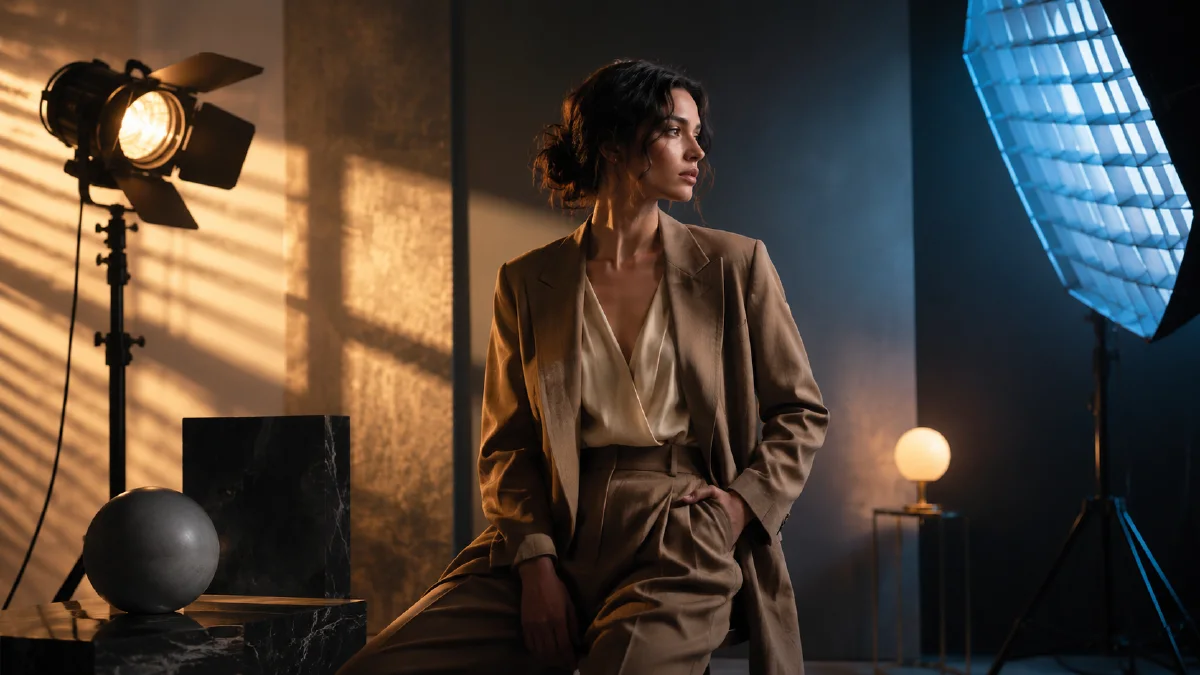
Lighting is spatial logic. It shapes depth, mood, material, and realism. To control it, describe three things: direction, contrast, and color temperature.
Use this guide for AI images, AI video prompts, product shots, portraits, anime scenes, and first frames for video generation.
The three-part lighting formula
Use:
Light direction + contrast ratio + color temperature.
Better prompt:
Warm sunlight enters from the right window, lights the subject's face, casts long shadows across the table, cool blue ambient shadow in the background, medium contrast lighting.
Weaker prompt:
Cinematic lighting, beautiful portrait, high detail.
The better prompt names the light source, path, subject, shadow, and temperature relationship. The model has less room to invent random glow.
Light direction
Light direction creates volume. Without direction, AI often makes everything evenly bright, which flattens the image.
| Direction | Best use | Prompt phrase |
|---|---|---|
| Side light | Texture, drama, portraits | warm key light from camera right |
| Back light | Separation, silhouette, hope | strong rim light behind the subject |
| Top light | tension, interrogation, stage mood | single overhead light casting downward shadows |
| Window light | realism, lifestyle, soft product shots | sunlight entering through a left-side window |
| Low light | suspense, unusual mood | faint floor-level light hitting the lower face |
For product images, directional light helps material read. Glass, metal, fabric, and matte plastic all need different highlight behavior.
Contrast ratio
Contrast tells the model how much difference should exist between light and shadow. Low contrast feels gentle and commercial. High contrast feels dramatic, cinematic, or mysterious.
Prompt phrases:
- "high contrast between illuminated face and dark background"
- "soft contrast with gradual shadow falloff"
- "background fading into deep shadow"
- "bright product edge against a dark studio"
- "smooth light falloff across the wall"
If an image looks flat, add contrast and shadow placement. If it looks harsh or muddy, soften the falloff and reduce the number of light sources.
Color temperature
Color temperature is not just "blue" or "orange." It explains the emotional and physical source of light.
| Situation | Prompt direction |
|---|---|
| Morning | cool misty light, pale blue ambient shadow |
| Afternoon | neutral daylight, clean material color |
| Golden hour | warm low-angle sunlight, long soft shadows |
| Night interior | warm lamp light against cool window shadow |
| Neon city | colored practical lights reflecting on wet surfaces |
Strong lighting prompts often combine two temperatures:
Warm amber desk lamp on the right creates a small pool of light, cool blue moonlight from the left window fills the background shadows.
This creates depth because the lights have different jobs.
Motivated light sources
Motivated light means the light comes from something visible or believable in the scene. It is one of the fastest ways to reduce the synthetic look.
Examples:
- A desk lamp lighting the product.
- A window casting a rectangular patch on the floor.
- A neon sign creating colored rim light.
- A phone screen lighting the creator's face.
- A candle lighting a book and fingers.
Prompt:
The only light source is a small desk lamp on the right side of the frame, casting warm light across the product and fading quickly into the dark background.
This is stronger than "warm moody lighting" because it gives the model a physical reason for the light.
Lighting prompt examples
Product studio
Premium product shot on black reflective table. Narrow violet rim light from behind outlines the product edge. Soft key light from camera left reveals the front surface. Background falls into deep shadow. Controlled reflections, high contrast, no random glow.
Creator portrait
Close portrait of a creator by a window. Soft daylight enters from the left, lighting one side of the face. The opposite side falls into gentle cool shadow. Natural skin texture, medium contrast, realistic indoor light falloff.
Anime night scene
Anime character on a rainy street. Warm shop light hits the face from the right, cool blue neon fills the background, wet pavement reflects both color temperatures, strong but clean contrast, cinematic night mood.
Lighting troubleshooting
| Problem | Fix |
|---|---|
| Image looks flat | Add one clear key light direction and shadow area |
| Scene looks fake | Add a motivated light source |
| Highlights look plastic | Reduce glossy words and specify material texture |
| Mood is too orange | Add cool ambient shadow or neutral daylight |
| Background steals attention | Let background fade into lower contrast shadow |
Lighting checklist
Before generating, ask:
- Where is the main light?
- What does it hit first?
- Where does shadow begin?
- Is the light warm, cool, or mixed?
- Is the source believable inside the scene?
When the light has direction, contrast, and temperature, the image stops looking like a filter and starts feeling like a physical space.
Lighting plan by output type
Choose lighting based on the job of the asset. A homepage hero needs immediate shape and mood, so it can use stronger contrast and a clear rim light. A product detail page needs accuracy, so the light should reveal material without hiding color. A creator-style video needs believable household or street lighting. A fantasy image can exaggerate light, but the source still needs to feel motivated by a window, sign, candle, moon, screen, or practical lamp.
Use this routing table when a prompt feels vague:
| Output | Lighting choice | Why it works |
|---|---|---|
| Premium product hero | Large soft key, thin rim, controlled reflection | Shows shape and material |
| Natural portrait | Window key, low fill, mild background falloff | Keeps skin believable |
| UGC ad | Phone-camera ambient light, small practical lamp | Feels native to social feeds |
| Beauty macro | Diffused top light with clean specular highlights | Shows texture without harsh pores |
| Night scene | Motivated neon or street light plus soft shadow | Makes darkness readable |
When reviewing outputs, separate lighting problems from style problems. If the image feels flat, add direction or reduce fill. If the product loses color, reduce colored light on the subject and keep color in the background. If the scene looks fake, name the physical source instead of using only mood words. "Soft violet rim light from a sign behind the subject" is easier to render than "cool futuristic atmosphere."
For stills, test a lighting phrase in the AI image generator before building a full campaign set. For motion, use the same light source in the AI video generator so the camera move does not introduce random flashes. Pair this guide with camera angle prompts, composition prompts, and realistic portrait prompts when you need lighting to support a specific shot rather than decorate it.
Save lighting recipes as reusable blocks. A recipe can be as simple as "large soft window key from camera left, weak warm practical behind subject, low contrast, natural skin texture." Reusing a recipe across a product page, ad, and social crop keeps the campaign coherent while still allowing changes in camera angle and composition.
Try it in Naviya
Build still-image lighting tests in Naviya AI Image Generator. When the light direction works, use Image to Video for controlled motion, or pair this guide with indoor lighting AI prompts when the scene depends on practical lamps, windows, and bounce light.