2026-06-12
AI Flat-Lay Outfit Poster Workflow for Social Commerce
Create Instagram-style flat-lay outfit posters from one product image with AI styling, layout, atmosphere, and magazine-inspired typography space.
Try this workflow in Naviya
Turn a product, hook, or campaign idea into short social-ready ad concepts.
Create video ad variants
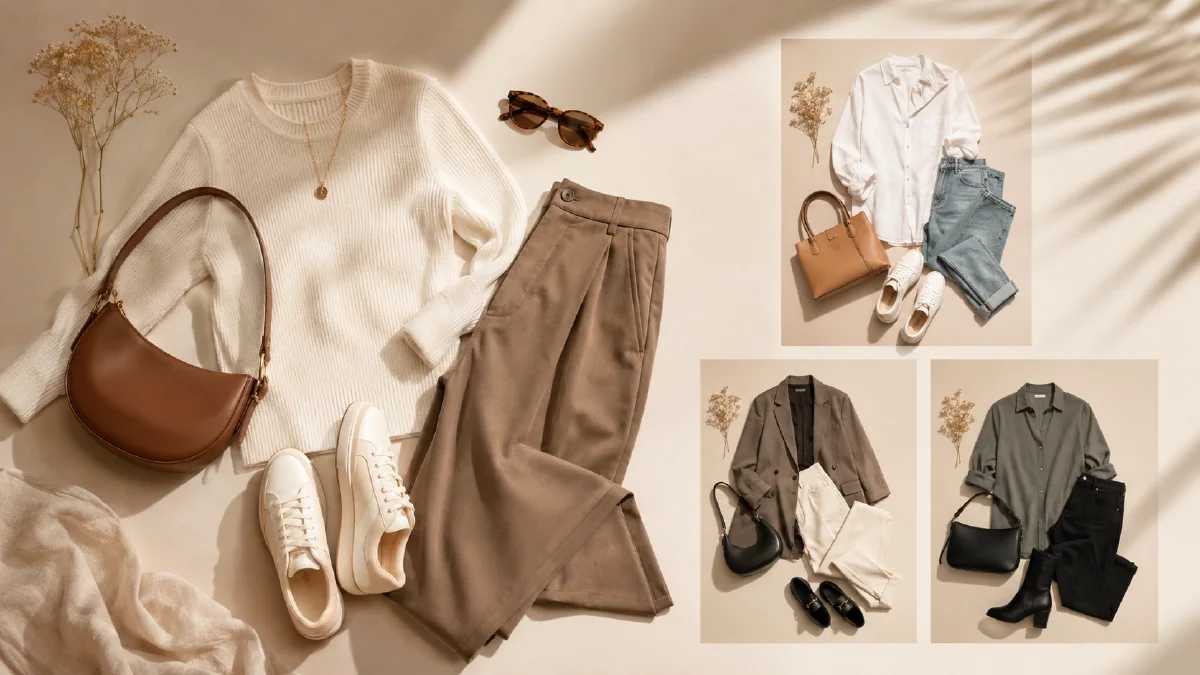
An AI flat-lay outfit poster workflow turns one clothing image into a social-ready outfit composition. It can create a single-item atmosphere shot, a full outfit grid, or a magazine-style poster with clean copy space. The format works well for Instagram, Pinterest, marketplace carousels, email modules, and product launches.
Flat lays are valuable because they show style without needing a model. They also help shoppers understand how to wear a product. A jacket becomes an outfit. A sweater becomes a mood. A pair of pants becomes a full styling idea.
Use AI Image Generator for the poster, Image to Video for subtle motion, and AI Video Ads when turning the flat lay into short campaign creative. Related guides include AI lookbook from single product image, batch fashion ecommerce image workflow, AI apparel design pattern workflow, and AI product scene generation.
Definition
A flat-lay outfit poster is a top-down or arranged product image showing clothing and accessories as a styled set. It can be minimal, cozy, editorial, seasonal, or magazine-like. AI helps by recognizing the main product and generating matching items, props, lighting, and layout.
The best flat lays do not feel random. Every object supports the main garment.
Step 1: Upload the product image
Start with a clear garment photo. Flat lay, hanger, or product cutout images work. Keep the item straight and evenly lit when possible.
Product preservation block:
Use the uploaded garment image as the hero item.
Preserve garment color, silhouette, fabric texture, pattern, collar, cuffs, hem, and key details.
Do not invent logos, extra pockets, or changed patterns.
Use this block in every prompt.
Step 2: Choose the generation mode
There are two practical modes.
| Mode | Goal | Best for |
|---|---|---|
| Single-item atmosphere | Make the product feel desirable | outerwear, knitwear, shoes, bags |
| Full outfit grid | Show how to style the item | tops, bottoms, jackets, accessories |
Single-item atmosphere
This mode highlights the product itself. The AI adds light, texture, and a few props. For example, a fleece jacket might sit in winter sunlight with a coffee cup, wool scarf, and magazine.
Prompt:
Create an Instagram-style flat-lay poster from the uploaded garment.
Mode: single-item atmosphere.
Scene: [winter morning, French cafe table, studio floor, travel packing, cozy bedroom].
Props: minimal and relevant to the garment mood.
Lighting: soft natural light, gentle shadows, realistic texture.
Layout: top-down composition, clean negative space for a short headline.
Constraints: preserve garment shape, color, fabric, and pattern. No clutter, no fake text.
Full outfit grid
This mode creates a complete outfit. The AI chooses matching pieces while keeping the uploaded item as the hero.
Prompt:
Create a full outfit grid flat lay.
Hero item: use the uploaded garment and preserve all details.
Styling: coordinate pants or skirt, shoes, bag, small accessories, and one lifestyle prop.
Mood: [minimal city, warm winter, Maillard style, resort, street casual].
Layout: balanced top-down outfit grid, magazine poster feel, clean spacing.
Constraints: hero item remains dominant, no fake logos, no unreadable text, no clutter.
Step 3: Add magazine poster logic
Flat-lay posters often work better with a simple editorial layout. Ask for copy space, not final text.
Poster layout block:
Poster layout: leave clean space for a short seasonal headline and small product note. Use editorial spacing, not busy collage. Keep all objects inside a balanced grid.
If the AI generates text, remove it or regenerate with "no readable text." Final copy should be added separately for clarity.
Step 4: Create seasonal variations
One product can support multiple moods:
| Mood | Props | Color |
|---|---|---|
| Warm winter | coffee, wool, book, amber light | cream, brown, navy |
| French vintage | magazine, sunglasses, leather bag | ivory, black, burgundy |
| Weekend street | sneakers, cap, headphones | gray, blue, white |
| Resort | straw bag, sandals, shell, linen | sand, white, aqua |
| Minimal studio | paper backdrop, shadow, one prop | black, white, neutral |
Generate three moods and choose based on the channel. Pinterest may favor more atmospheric layouts. Ecommerce may need cleaner product visibility.
Export planning
Create the flat lay with multiple crops in mind:
| Format | Use | Composition note |
|---|---|---|
| 1:1 | Instagram feed, marketplace | Keep hero item centered and readable |
| 4:5 | social feed, paid ads | Leave vertical breathing room |
| 9:16 | stories, short video | Stack accessories around the hero item |
| 16:9 | email and banners | Place the hero item left or right with copy space |
If the first image only works in one crop, regenerate with clearer spacing. A reusable flat lay should survive at least square and vertical formats.
Step 5: Animate lightly
A flat lay can become a short social clip:
Animate this flat-lay outfit poster into a 4 second social clip.
Camera: slow top-down push-in.
Motion: soft sunlight shifts across the objects, fabric edges move slightly, small props remain stable.
Style: polished social commerce visual, calm and realistic.
Constraints: preserve garment details and layout, no new text, no object warping.
Use Image to Video for subtle movement. For paid social, create a hook-led version in AI Video Ads.
Build a single-SKU content set
A flat-lay poster becomes more useful when it is planned as a small content set, not a one-off image. For one hero garment, generate:
- Catalog support image: clean background, garment and two styling items, minimal props.
- Social outfit poster: fuller mood, seasonal accessories, more editorial spacing.
- Detail crop: fabric, buttons, collar, stitching, or print.
- Vertical story frame: stacked layout with negative space at top.
- Motion frame: the same layout with enough margin for a slow push-in.
Keep the product note identical across the set. Change only the styling purpose. This helps shoppers see the same garment as a product, outfit idea, and campaign asset without wondering whether it changed color or material.
Common flat-lay failures are easy to diagnose. If the image feels like clutter, reduce the prop count and ask for a grid. If the product feels inaccurate, move the hero item to the center and describe its silhouette first. If the poster has fake text, ask for "blank magazine layout space" and add real copy later. If the motion crop feels cramped, regenerate the still with more margin instead of forcing a zoom.
The best flat lay gives the viewer a styling decision they can copy: what goes with the item, what season it belongs to, and what mood it creates.
For a brand calendar, save the winning layout as a reusable formula. Swap props by season while keeping the same camera angle, spacing, and product protection line. This makes a spring drop, holiday edit, or sale teaser feel connected without repeating the exact same poster.
Try it in Naviya
Upload one garment image to AI Image Generator. Generate one single-item atmosphere poster and one full outfit grid. Then use Image to Video to create a subtle motion version for social posts.
Flat-lay QA checklist
- The hero garment remains accurate.
- Styling items match the product's season and price point.
- Layout has breathing room.
- Props do not distract from the product.
- No fake readable text appears.
- The crop works for square and vertical formats.
- The image communicates a clear outfit idea.
Flat lays are a low-cost way to multiply fashion content. With a structured prompt, one product image can become a social poster, styling guide, product page support image, and campaign teaser.