2026-06-12
AI Plog Content Workflow: Turn One Product Into a Nine-Image Story
Create Plog-style social content with AI using a digital model, a nine-image plan, parallel image generation, and natural caption writing.
Try this workflow in Naviya
Turn a product, hook, or campaign idea into short social-ready ad concepts.
Create video ad variants
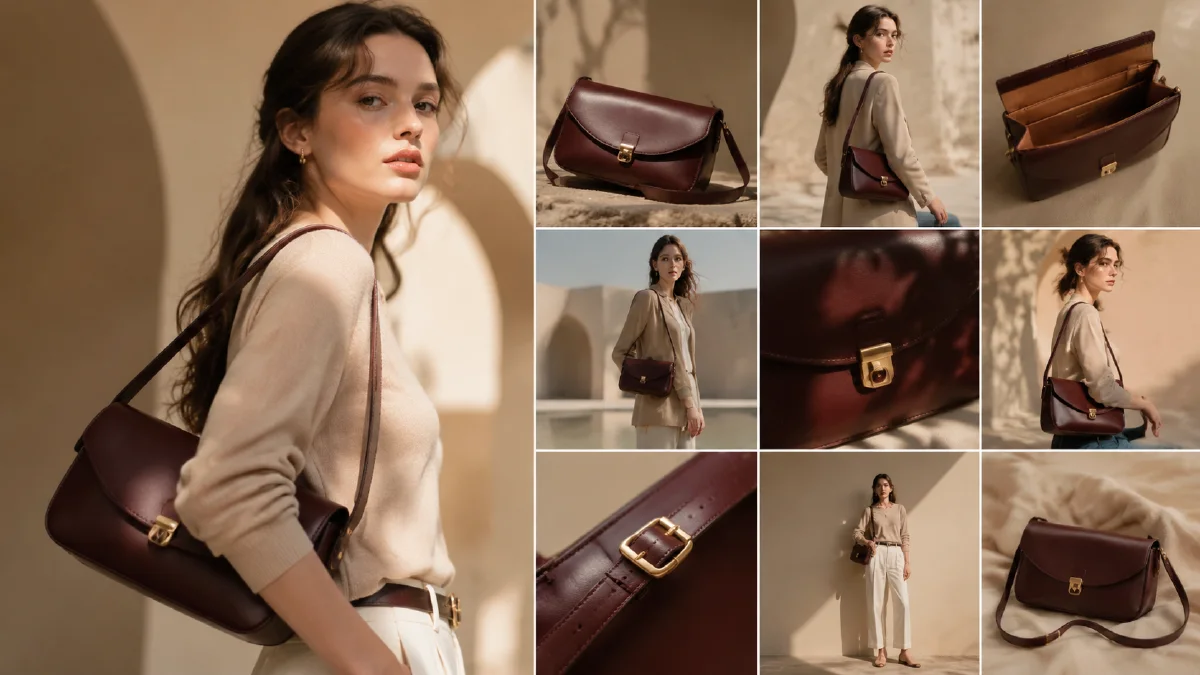
A Plog is a photo-blog style grid that feels casual, lived-in, and personal. For fashion and lifestyle products, it often works better than a standard product image because it shows the item inside a day, not just on a blank background. An AI Plog workflow turns one product photo into a nine-image story with model shots, detail shots, mood images, and a natural caption.
The format is especially useful for social commerce. A nine-image grid can show the product, the outfit, the setting, and the feeling around the purchase. The best Plogs feel effortless, but the workflow behind them is structured.
Use AI Image Generator for the grid images, Image to Video for motion versions, and AI Video Ads for social ad cuts. Related guides include AI flat-lay outfit poster workflow, AI lookbook from single product image, batch fashion ecommerce image workflow, and UGC AI video ad prompts.
Definition
A Plog is a photo-driven social post that tells a casual story through multiple images. In ecommerce, a product Plog uses a grid to mix product proof with lifestyle atmosphere. It should feel like a day-in-the-life post, not a hard sales page.
The 3-3-3 rule
Use a balanced nine-image plan:
| Group | Count | Purpose |
|---|---|---|
| Product | 3 | Show the item clearly |
| Emotion | 3 | Show model, movement, human moment |
| Atmosphere | 3 | Show setting, props, light, mood |
This prevents the post from becoming either too commercial or too vague.
Step 1: Build the model and product base
Start with the product image and a model profile. If the product is apparel, create a base image where the model wears the item accurately.
Prompt:
Create a realistic lifestyle base image for a Plog post.
Model: [profile].
Product: use the uploaded garment image and preserve details.
Scene: casual day-in-the-life setting that fits the product.
Style: natural phone-photo feeling, polished but not overly commercial.
Constraints: accurate product color, fit, fabric, and pattern. Natural pose, no fake text.
This base image anchors the grid.
Step 2: Plan the nine images
Ask for a nine-image plan before generating. The plan should include composition, subject, scene, and caption idea.
Planning prompt:
Create a nine-image Plog plan for this product.
Use the 3-3-3 rule: 3 product images, 3 emotional model images, 3 atmosphere images.
For each image, provide: image role, scene, camera angle, visual details, and short caption idea.
Keep the tone casual, lived-in, and not too salesy.
Example grid:
- Product on chair with morning light.
- Model mirror shot.
- Sleeve texture close-up.
- Walking coffee run.
- Outfit detail with bag.
- Window light portrait.
- Cafe table mood shot.
- Street corner light and shadow.
- Final full outfit frame.
Image role breakdown
The nine images should not compete with each other:
| Role | What to show | What to avoid |
|---|---|---|
| Product 1 | clear garment or object | too many props |
| Product 2 | texture or detail | hiding the material |
| Product 3 | styled product context | changing the item |
| Emotion 1 | model wearing or using it | stiff catalog pose |
| Emotion 2 | candid movement | face or hand distortion |
| Emotion 3 | quiet personal moment | heavy sales framing |
| Atmosphere 1 | place | random unrelated objects |
| Atmosphere 2 | light and mood | clutter |
| Atmosphere 3 | closing memory image | product confusion |
This breakdown keeps the grid balanced and prevents repeated shots.
Step 3: Generate the grid images
Generate each image separately, but keep the same color mood and environment.
Image prompt:
Create image [number] in a nine-image Plog series.
Role: [product, emotion, atmosphere].
Scene: [specific scene from the plan].
Product: keep the uploaded product visually consistent when visible.
Style: natural lifestyle photo, phone-photo realism, soft film filter, casual social content.
Color mood: [warm cafe, soft winter, clean city, weekend travel].
Constraints: no fake text, no distorted hands, no changed product details.
For atmosphere shots, the product does not always need to appear. A coffee cup, messy desk, sunlit curtain, or street sign can help the grid feel lived-in.
Step 4: Write the caption
Plog captions should feel personal and light. Avoid heavy selling.
Caption template:
Title: [short mood line]
Body: [2 to 4 sentences about the day, outfit, feeling, or small detail]
Soft product mention: [one natural line]
Tags: [5 to 8 platform-friendly tags]
Example:
Title: soft layers for a slow morning
Body: Left early, got coffee, and somehow this knit made the whole outfit feel finished. The texture is the part I keep noticing in every photo.
Soft product mention: Wearing the new ribbed cardigan in cream.
Tags: #dailylook #softstyle #cozyfit #plog #outfitnotes
Step 5: Convert to video
Use the grid as a short slideshow or animate two hero images:
Animate this Plog image into a 4 second social clip.
Camera: subtle phone-like push-in.
Motion: light shifts, fabric moves slightly, model makes a small natural movement.
Style: casual lifestyle video, soft film look.
Constraints: preserve product and face consistency, no new text.
Plan the grid before generating
A Plog works when the images feel collected from the same day. Before generating, write a nine-frame grid plan with roles: cover moment, product detail, human moment, environment, texture, routine, product-in-use, quiet transition, and closing mood. This prevents the post from becoming nine unrelated pretty pictures.
Keep the camera language consistent. If the cover is phone flash, let one or two supporting frames use flash too. If the cover is soft morning light, avoid suddenly adding a dark studio render in the middle. Product posts can still feel natural, but they need a visual rhythm that makes the audience believe the moments belong together.
Caption planning matters as much as image planning. Write one short caption for the whole post and two or three optional micro-captions for individual slides. Avoid turning every frame into a sales point. A good Plog lets the product appear inside a lifestyle pattern, then uses the caption to make the value clear.
A practical grid rhythm is wide, close, human, object, quiet, detail, action, atmosphere, and closing frame. The order can change, but the mix should not. If every image is a close-up, the post feels cramped. If every image is wide, the product disappears. Keep one visual rest frame so the grid has breathing room.
When the product is subtle, repeat it in different roles instead of forcing it into every frame. One direct product image, one in-use image, and one background appearance can feel more authentic than nine obvious placements.
Try it in Naviya
Upload one product image to AI Image Generator, create a nine-image Plog plan, and generate the grid one image at a time. Animate the best lifestyle image with Image to Video or build a short social ad in AI Video Ads.
Plog QA checklist
- The grid has product, emotion, and atmosphere balance.
- The product appears clearly in at least three images.
- The color mood feels consistent.
- The caption sounds natural.
- The post does not feel like a hard sell.
- The product details remain accurate.
A good Plog makes the product feel part of a real moment. AI can generate the images quickly, but the structure is what makes the grid feel intentional.