2026-06-12
AI Jewelry Ring Ad Images with Real Product References
Create luxury-style jewelry ad images by combining hand-model scenes, real ring references, product replacement, prompt structure, and final QA.
Try this workflow in Naviya
Use references when identity, product shape, outfit, or style needs to stay consistent.
Try reference to video
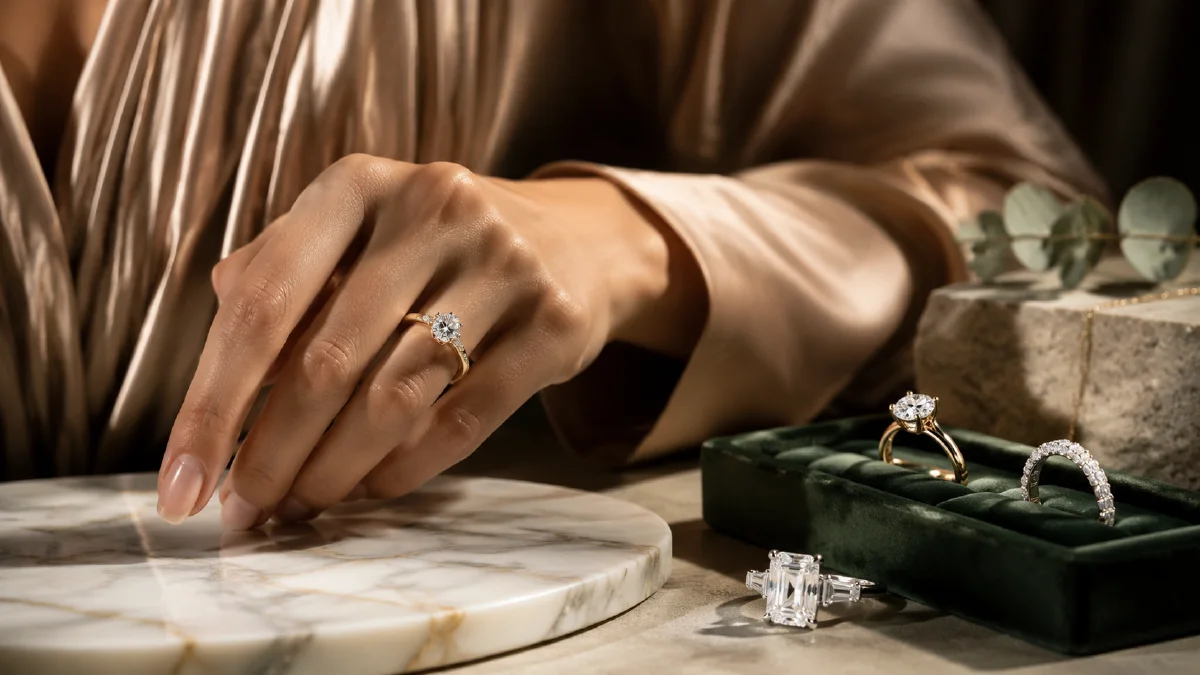
Jewelry is one of the hardest ecommerce categories for AI images because the product is small, reflective, symbolic, and detail-heavy. A ring can look beautiful in a generated scene and still fail commercially if the setting changes the stone cut, band width, prong shape, or metal color. The best workflow separates the problem into two stages: generate an atmospheric hand-model scene first, then insert the real product reference into that scene with careful replacement and retouching.
This guide explains how to create luxury-style ring ad images without implying affiliation with any real jewelry house. It is designed for concept campaigns, independent jewelry brands, and ecommerce teams that need polished visuals from approved product references. Use it with reference image prompting, AI product photography to video, Naviya's AI Image Generator, and Reference to Video.
The two-stage jewelry workflow
A good jewelry image must satisfy two goals at once:
| Goal | What AI should do |
|---|---|
| Atmosphere | Create a hand pose, lighting mood, background, and luxury composition. |
| Accuracy | Preserve the real ring's stone, band, setting, metal color, and scale. |
Trying to generate both in one prompt can work for loose concept art, but it is risky for product visuals. A better process is:
- Generate several hand-model scenes with placeholder rings.
- Choose the scene with the best pose, lighting, and negative space.
- Remove or soften the placeholder ring.
- Insert the real ring reference onto the correct finger.
- Retouch reflections, contact shadows, finger pressure, and scale.
- Export a campaign crop and a product-page crop.
This keeps the creative direction flexible while protecting the product details that shoppers care about.
Use a six-part prompt structure
Jewelry prompts become stronger when they include six parts:
- Subject and details: hand, gesture, ring type, skin texture, manicure, fabric.
- Environment: studio, wedding setting, boutique counter, window light, textured background.
- Style: editorial, cinematic, modern luxury, minimalist product ad.
- Composition: close-up, 16:9 hero, vertical poster, hand entering from left, negative space.
- Color: cool silver and pale blue, warm white and gold, green contrast, beige minimalism.
- Rendering and clarity: realistic photography, shallow depth of field, crisp reflections.
This structure prevents the prompt from becoming a mood board with no control. It also makes it easier to create a coherent set of images for the same campaign.
Six scene directions for ring ads
Use these directions as starting points:
| Direction | Best use | Visual cue |
|---|---|---|
| Minimal editorial | Product page hero | Hand adjusting soft knit fabric, clean background, natural light. |
| Wedding cinematic | Bridal campaign | Ring placement moment, warm shallow depth of field. |
| Power contrast | High-impact ad | Polished hand near sculptural texture, dark green or black background, sharp flash. |
| Modern product ad | Website hero | Hand crossing beige background, white manicure, clean negative space. |
| Bridal close-up | Emotional social ad | Soft white fabric, ring glint, gentle gesture. |
| Ultra-minimal luxury | Logo overlay | Hand from left to right, plain background, precise ring focus. |
For product pages, the modern product ad and ultra-minimal directions are usually safest. For social ads, wedding cinematic and power contrast can create stronger hooks.
Prompt examples
Minimal editorial:
Close-up editorial fashion photograph of an adult woman's hand wearing a simple placeholder ring while adjusting a soft knit sweater.
Clean minimal background, natural window light, smooth skin texture, visible knit fibers, shallow depth of field.
Cool pale blue, skin tone, and silver color palette.
Realistic luxury jewelry advertising style, sharp focus on the hand and ring area, vertical 3:4 crop.
Wedding cinematic:
Cinematic 16:9 close-up of a wedding ring being placed on an adult hand during a ceremony.
Softly blurred romantic background, warm white and gold light, shallow depth of field.
The ring area is central and sharp, fingers natural, emotional but restrained luxury mood.
Realistic photography, refined highlight on the stone, no visible text.
Modern beige product ad:
Modern luxury jewelry product image: an adult woman's hand moves horizontally across a warm beige studio background.
White French manicure, soft warm light, elegant relaxed fingers, ring area clearly visible.
Minimal composition with clean negative space for logo placement.
Realistic commercial photography, high detail skin texture, balanced diamond reflection.
After generating scenes, keep only the frames where the finger angle can physically support your ring reference. Avoid extreme bends or hands partially hidden by fabric unless the ring is meant to be secondary.
Replace the ring with a real reference
Use a crisp product reference: an official product render from your own catalog, a clean macro photo, or a screenshot from an approved 3D product viewer. The replacement instruction should be simple and physical:
Place the ring from image 1 onto the ring finger in image 2.
Keep the hand pose, lighting, skin texture, and background unchanged.
Match the ring scale, perspective, contact shadow, and metal reflection to the finger.
Preserve the ring's stone shape, band width, prongs, and metal color.
If there is already a placeholder ring, remove it first:
Remove the existing ring from the hand.
Reconstruct natural skin texture and finger shape.
Keep lighting, manicure, and background unchanged.
Then insert the real ring. This two-step process is often cleaner than asking the model to replace everything at once.
Jewelry QA checklist
Inspect the final image closely:
- Stone cut matches the real product.
- Band thickness and prong count are correct.
- Ring scale fits the finger naturally.
- Finger indentation or shadow makes contact believable.
- Metal reflection matches scene lighting.
- No extra stones, duplicate bands, or warped hands appear.
- The image is beautiful at full size and clear at mobile thumbnail size.
For paid ads, generate several versions but only publish the one with the cleanest product accuracy. Jewelry shoppers notice small differences, and product returns can start with a misleading image.
Moving from stills to video
Jewelry motion should be subtle. Use a slow hand turn, a small sparkle shift, fabric movement, or a camera push. Do not ask for complex finger choreography unless the ring is very large in frame.
Subtle luxury jewelry video from the uploaded ring image.
The hand slowly turns a few degrees, the diamond reflection glints naturally, soft fabric moves slightly.
The ring design stays accurate and sharp, warm studio light, shallow depth of field, elegant slow camera push.
For more product video structure, read AI fashion accessory video ads and test movement in Naviya's Image to Video Generator.
Approval notes for high-detail jewelry
Jewelry ads need a stricter approval bar than many lifestyle images. A viewer may not notice a changed sleeve seam, but they will notice if a ring's stone shape, prong count, or band thickness changes. Build a simple review routine: compare the output beside the product reference, zoom into the ring area, then zoom out to mobile thumbnail size. The image has to pass both views.
If the ring is correct but the hand looks unnatural, repair the hand scene before replacing the product again. If the hand is beautiful but the ring is inaccurate, keep the scene as a background candidate and rerun the placement with stronger product protection. For paid media, create a "safe crop" that keeps the ring large enough to inspect and leaves clean negative space for real typography added outside the generated image.
A practical jewelry set can include a hero hand image, a macro sparkle image, a lifestyle ceremony image, and a minimal product image. Together they answer emotion, detail, occasion, and purchase clarity.
Try it in Naviya
Generate three hand-model directions in Naviya's AI Image Generator, choose the frame with the cleanest ring placement, then use your approved product reference for replacement. When the still is approved, create a quiet sparkle-focused clip with Reference to Video or build a complete jewelry spot in AI Video Ads.