2026-06-12
AI Flash Fashion Editorial Workflow for Black-Backdrop Product Shots
Create black-backdrop flash fashion editorials with custom models, pose references, product images, and AI image generation.
Try this workflow in Naviya
Use references when identity, product shape, outfit, or style needs to stay consistent.
Try reference to video
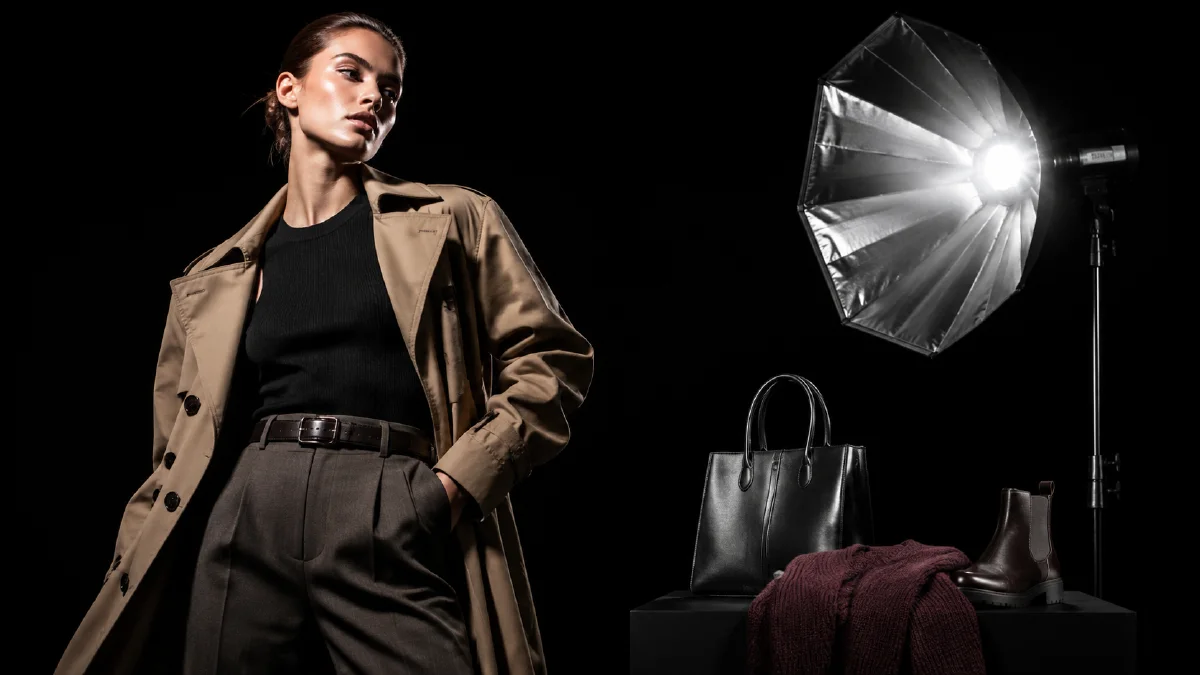
An AI flash fashion editorial workflow turns a clothing product image into a dramatic black-backdrop campaign shot. The look is familiar from magazine covers, backstage photography, and paparazzi-style flash images: hard light, dark background, confident pose, glossy contrast, and a product that feels more desirable than it did in the flat lay.
The workflow has three main inputs: the model description, the pose reference, and the product image. AI handles the rest: building the model, matching the pose, dressing the model in the apparel, and applying the flash editorial finish.
Use AI Image Generator for the stills, Reference to Video if you want consistent model motion, and Image to Video for short fashion clips. Related guides include ecommerce AI model photos, multi-angle model references, AI apparel model workflow, and AI fashion brand video ads.
Definition
A flash fashion editorial is a stylized fashion image where strong direct light defines the subject, often against a dark or minimal background. It is not a standard ecommerce mannequin shot. It is a campaign image built to create attitude.
AI makes this style useful for early fashion testing because one product image can generate several model, pose, and mood options before a brand commits to a shoot.
Step 1: Define the model
The model description is the visual DNA of the image. Be concrete but respectful. Focus on age range, body type relevant to fit, hair, styling, attitude, and brand energy.
Template:
Model age range:
Gender presentation:
Skin tone:
Build:
Hair:
Facial features:
Attitude:
Brand mood:
Example:
Model age range: mid 20s.
Gender presentation: feminine.
Skin tone: warm medium.
Build: tall, athletic, relaxed posture.
Hair: long black straight hair, slightly windswept.
Facial features: defined cheekbones, confident gaze.
Attitude: cool, editorial, unbothered.
Brand mood: midnight streetwear with luxury magazine energy.
If you need a brand-consistent model across many products, save the best model image and reuse it as a reference.
Step 2: Upload a pose reference
The pose reference can be a street photo, a fashion pose, a runway frame, or a quick sketch. What matters is readability. The body position should be clear, with minimal occlusion.
Good pose references:
- Full-body or half-body.
- Clear arm and leg position.
- Strong silhouette.
- Minimal overlapping props.
- Camera angle similar to the desired output.
Avoid references where the clothing is hidden by a bag, hair, or another person. AI cannot fit a garment cleanly when the pose does not expose the product.
Step 3: Upload the product image
Use a flat lay, hanger shot, mannequin shot, or clean product photo. White or plain backgrounds work best. Add preservation rules:
Use the uploaded clothing image as the garment reference.
Preserve silhouette, fabric texture, color, pattern, collar, cuffs, hem, and key details.
Fit the garment naturally to the model body.
Do not invent extra logos, patterns, pockets, or closures.
For shiny fabrics, mention reflectivity. For knitwear, mention texture and thickness. For structured jackets, mention shoulders, seams, and collar shape.
Step 4: Generate the editorial image
Full prompt:
Create a black-backdrop flash fashion editorial image.
Model: [model description].
Pose: follow the uploaded pose reference, keep body position and silhouette clear.
Garment: use the uploaded clothing image as the garment reference and preserve details.
Lighting: direct on-camera flash, high contrast, glossy highlights, deep black background.
Camera: fashion magazine portrait, slightly low angle, crisp focus.
Style: premium editorial, confident, modern, dramatic.
Constraints: natural hands, accurate garment fit, no extra logos, no warped limbs, no fake text.
Generate several versions. Select for garment accuracy first, pose second, mood third. A beautiful pose that changes the clothing is not a useful product asset.
Step 5: Build a small campaign set
Create at least four shots:
| Shot | Use |
|---|---|
| Full-body flash shot | Campaign hero and social |
| Half-body crop | Product page and feed |
| Detail crop | Fabric, zipper, collar, sleeve |
| Alternate pose | Testing and carousel variety |
This gives the product enough range for a mini campaign.
Shot variations to test
Flash editorials are flexible. Try one conservative ecommerce version and one bolder campaign version:
| Variation | Prompt direction |
|---|---|
| Clean black studio | Model stands clearly, garment fully visible, simple shadow |
| Paparazzi hallway | Slight handheld angle, hard flash, confident walking pose |
| Magazine cover | Strong centered crop, glossy contrast, controlled negative space |
| Backstage moment | Model adjusting sleeve or collar, candid but polished |
| Detail flash | Tight crop on zipper, knit, button, or fabric shine |
The conservative version protects product accuracy. The bolder version tests whether the brand can support a more editorial attitude. Keep both if they serve different channels.
Animate the look
Flash editorials can become short fashion clips with restrained motion:
Animate this flash fashion editorial into a 4 second clip.
Camera: slight handheld push-in.
Motion: model shifts weight subtly, fabric moves naturally, flash glints across the garment.
Style: black-backdrop fashion campaign, paparazzi flash, premium editorial.
Constraints: preserve face, pose, garment design, fabric color, and body proportions.
For ecommerce, keep motion small. The clothing must remain readable.
Try it in Naviya
Start with a clean clothing product image in AI Image Generator. Add a model description and pose reference, then generate full-body and half-body versions. Animate the strongest image with Image to Video or build campaign cuts in AI Video Ads.
Editorial retouch and selection pass
Flash editorials look strong because the frame is simple, but that simplicity also makes defects obvious. Run a selection pass before using any image in a campaign.
Check:
- Does the garment shape match the approved product?
- Are seams, straps, cuffs, logos, and closures believable?
- Does the flash create controlled shine instead of plastic glare?
- Is the black backdrop clean without swallowing dark fabric?
- Does the model pose explain the garment rather than hide it?
- Can the image crop to square, vertical, and story formats?
When a result has the right pose but weak product detail, regenerate with stronger garment constraints instead of adding more style language. When the product is accurate but the pose feels frozen, use a different pose reference or move the still into Reference to Video with subtle motion only.
For a campaign set, choose one hero, two alternate crops, and one detail image. The hero carries the editorial mood. The alternates support ecommerce and social placements. The detail image proves material quality. This gives the visual system range without making the black-backdrop look repetitive.
Save the prompt block that produced the cleanest flash falloff. It can become a reusable studio recipe for future garments, especially when a brand needs a consistent black-backdrop series across multiple product drops.
Name that recipe clearly so future reviewers know which crop, flash strength, and pose family it was designed to support.
Quality checklist
Before using the image:
- The clothing silhouette matches the product.
- The pattern and color are accurate.
- Hands and limbs look natural.
- The pose does not hide the garment.
- The black backdrop is clean.
- The flash effect feels intentional, not accidental.
- The crop works for product page, social, and ad formats.
The black-backdrop flash look is powerful because it turns product documentation into attitude. Keep the workflow disciplined: define the model, control the pose, preserve the garment, and let the flash style add drama.