2026-06-12
Realistic AI Portrait Prompts: Remove the Overprocessed Look
Write realistic AI portrait prompts that reduce plastic skin, beauty-filter lighting, perfect poses, and overprocessed editorial effects.
Try this workflow in Naviya
Use the guide to shape a still image, then keep it as a first frame or campaign asset.
Open the studio
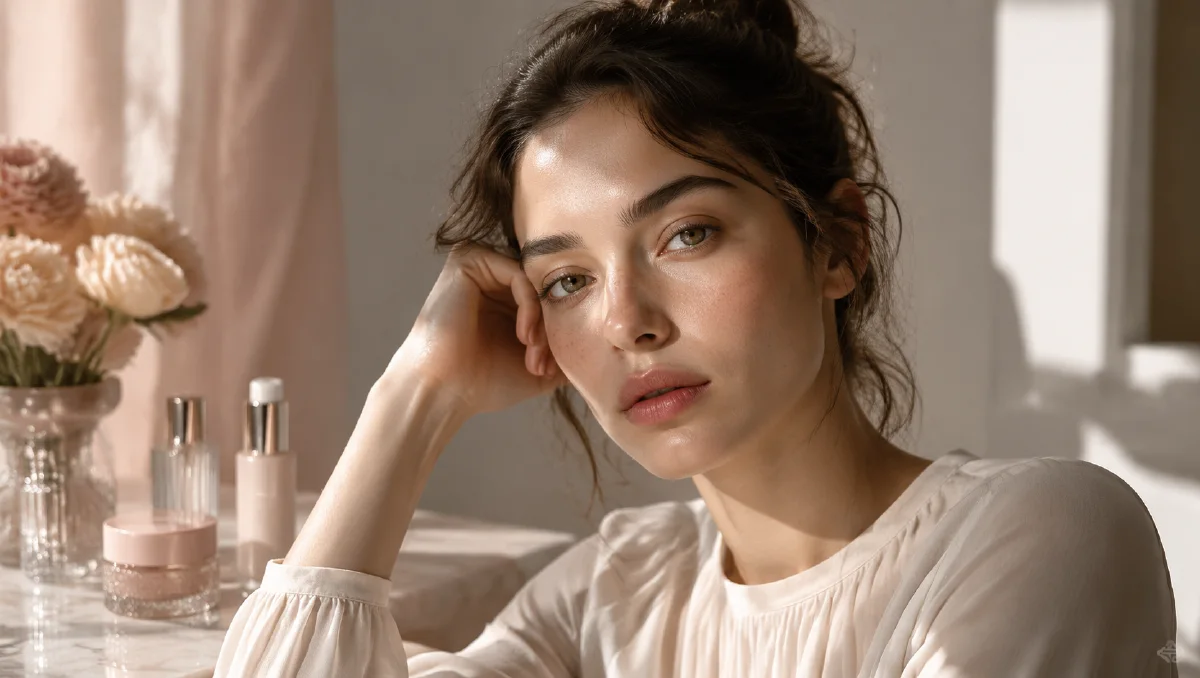
Realistic AI portrait prompts are harder than they look. Many models can create a beautiful face, but the result often feels overprocessed: smooth plastic skin, glowing cheeks, perfect symmetry, polished studio light, and a background that looks more designed than lived in.
The problem is not a lack of detail. It is usually too much polish. Words like "perfect," "flawless," "cinematic," "ultra detailed," and "soft beauty lighting" can push the model toward retouched campaign imagery. If your goal is a person who feels alive, you need to prompt for organic texture, available light, and imperfect photography.
Use this guide with Naviya AI Image Generator, creator portraits, profile visuals, first frames for image to video, and UGC-style scenes. For broader unposed framing, read the candid AI photo prompts guide too.
Why AI portraits look too polished
AI models learn from a mix of phone photos, portraits, ads, editorial images, renders, and heavily retouched social content. When the prompt asks for a "beautiful portrait," the model often averages toward the most common polished signals: smooth skin, clean highlights, symmetrical face, perfect hair, and an idealized expression.
To get realism, do not simply add more detail. Change the kind of detail.
Weak prompt:
Beautiful woman portrait, perfect face, smooth skin, soft cinematic lighting, ultra detailed, 8k, glossy finish.
Better prompt:
Natural close portrait photo, realistic biological skin texture, uneven skin tone, fine peach fuzz, tiny flyaway hairs, available window light from the left, relaxed expression, subtle digital noise, no beauty retouching.
The second prompt moves from beauty filter language to physical photography language.
Use material words, not beauty words
Skin is not a flat surface. It has pores, oil variation, tiny hairs, color shifts, and subsurface softness. A realistic prompt should make the model render skin as organic material, not as an airbrushed mask.
Useful phrases:
- "biological skin texture"
- "visible pores without heavy sharpening"
- "uneven skin tone"
- "fine peach fuzz"
- "subtle under-eye texture"
- "natural skin translucency"
- "tiny flyaway hairs"
- "mild facial asymmetry"
- "raw photograph"
- "minimal retouching"
Avoid stacking harsh flaw words until the portrait becomes unflattering or exaggerated. The goal is believable human texture, not a catalog of imperfections.
Replace perfect lighting with physical lighting
Overprocessed portraits often have light that comes from nowhere. The face is bright, the background is bright, the eyes glow, and shadows disappear. Real portraits usually have a source: a window, a lamp, a cloudy street, a phone screen, or a bounced wall.
Use the same logic from AI lighting prompts, but make it portrait-specific:
Soft daylight enters from a left-side window, lighting one side of the face. The opposite cheek falls into gentle cool shadow. Background stays slightly darker. Natural skin texture, no beauty dish, no glossy studio highlight.
For indoor scenes, specify falloff:
Warm desk lamp close to the subject creates a small pool of light across the face and hands. Light fades quickly toward the background shelves, leaving realistic shadow depth.
That kind of prompt tells the model where the light begins and where it stops. Practical lamps, bounce light, and shadow falloff are often the difference between a real room and a beauty-filter background.
Add camera behavior
Camera language can reduce the generated look. A portrait described as "editorial beauty campaign" will often become polished. A portrait described as "iPhone-style candid photo" or "35mm documentary portrait" has a different texture.
Choose one camera direction:
| Camera feel | Best for | Prompt phrase |
|---|---|---|
| Phone photo | everyday realism | iPhone-style portrait, natural focus, slight digital noise |
| 35mm film | soft grain and color | 35mm film portrait, Kodak Portra 400, subtle grain |
| Documentary | unposed emotion | handheld documentary portrait, imperfect framing |
| Studio DSLR | controlled but realistic | 50mm portrait lens, soft side light, minimal retouching |
Do not mix every camera type. One clear device is stronger than five conflicting references.
Break the centered beauty pose
Generated portraits become artificial when the person appears to be waiting for the camera. Make the moment feel observed.
Try:
- "caught mid-thought"
- "not looking directly at camera"
- "slight head turn"
- "relaxed jaw"
- "one shoulder closer to camera"
- "hair not perfectly arranged"
- "hands partially visible, natural posture"
- "slightly off-center framing"
If the face must stay clear, say so. Realism does not mean losing readability:
Slightly off-center candid portrait, face still clear and in focus, natural expression, one small motion blur in the hair, realistic skin texture.
Prompt examples
Natural window portrait
Close portrait photo of a creator near a cafe window, 50mm lens, soft daylight from camera left, opposite side of the face in gentle cool shadow, biological skin texture, uneven skin tone, fine peach fuzz, tiny flyaway hairs, relaxed expression, raw photograph, minimal retouching.
Phone-style profile photo
iPhone-style portrait in a small apartment kitchen, eye-level camera, natural indoor light, slight digital noise, realistic pores, mild facial asymmetry, casual posture, background lightly cluttered but clean, no studio lighting, no airbrushed skin.
Cinematic but not fake
35mm film portrait at night, warm practical lamp on the right, cool window shadow in the background, subtle grain, natural skin translucency, relaxed unposed expression, soft shadow falloff, no glossy beauty retouching, no perfect plastic skin.
Troubleshooting
If the portrait still looks too polished, remove words that imply retouching: "perfect," "flawless," "glamour," "beauty campaign," "8k render," "unreal engine," "glossy," and "ultra smooth."
If the face becomes too rough, keep the realism but soften the instruction: "natural skin texture, clean portrait lighting, flattering but not retouched."
If the lighting looks fake, name the source and the falloff. If the pose looks staged, add one observed action and one imperfect framing detail.
Portrait review checklist
Realistic portraits should be judged by believability, not by smoothness. Review skin texture, eye direction, hairline, ear shape, hand placement, clothing seams, and background logic. If the portrait looks like a beauty filter, add more physical context: uneven window light, slight fabric wrinkles, natural flyaway hair, mild under-eye texture, or a real camera distance. If the portrait looks harsh, soften the light source rather than removing all texture.
Use restraint with flaw language. The goal is not to make a subject look worse. The goal is to avoid plastic perfection. Phrases like "natural skin texture," "realistic pores," "soft asymmetry," and "unretouched editorial feel" are usually more useful than long lists of imperfections. Keep the expression simple and motivated: a small smile after hearing a joke, a focused look while reading, or a quiet glance toward a window.
For professional use, create three variants: clean profile photo, editorial portrait, and social crop. The profile version should be direct and trustworthy. The editorial version can have richer light and background. The social crop needs safe space for UI and captions. Generate stills with the AI image generator, animate subtle expression with image to video, and use micro-expression prompts when the portrait needs to become a short character moment.
Try it in Naviya
Create the portrait in Naviya AI Image Generator. If the portrait will become a short creator clip, keep the first frame clear and continue in Image to Video. For a consistent person across clips, use Reference to Video and preserve the same face, hair, outfit, and camera feel.
Realistic AI portraits come from restraint. Prompt for physical skin, believable light, and human camera behavior, then remove the words that make the model overperform.