2026-06-12
Digital Human Knowledge Creator Video Workflow
Create a believable digital knowledge creator with a warm portrait, natural voice, performance notes, and short-form talking video assembly.
Try this workflow in Naviya
Use the guide to shape a still image, then keep it as a first frame or campaign asset.
Open the studio
Knowledge creators need trust before they need spectacle. A digital presenter can look polished and still fail if the face feels like an ID photo, the voice has no emotional shape, or the gestures do not match the script. The better workflow starts with a relatable visual identity, pairs it with natural voice direction, and uses performance notes to keep the final talking video warm instead of stiff.
This guide is for educational creators, product explainers, wellness accounts, coaching channels, and brand channels that need repeatable talking videos without a full studio day. For more campaign-focused examples, see talking fashion creator AI videos, multilingual AI supplement spokesperson videos, and AI virtual host supplement videos. If you already have a portrait reference, use Naviya reference-to-video to keep the face and style stable.
What makes a digital knowledge creator believable?
A digital knowledge creator is a repeatable AI presenter designed to explain ideas, summarize topics, or guide an audience through decisions. Believability comes from alignment across four layers:
| Layer | What it controls | Common failure |
|---|---|---|
| Visual identity | Face, styling, background, lighting | Too corporate or too perfect |
| Voice | Pace, emotion, pauses, warmth | Robotic delivery |
| Performance | Eye contact, hands, posture, micro-expression | Frozen face or random gestures |
| Script | Hook, explanation, examples, CTA | Sounds like generic narration |
The strongest creators are not the most glamorous. They are specific, approachable, and easy to watch for more than ten seconds.
Step 1: Design a relatable portrait
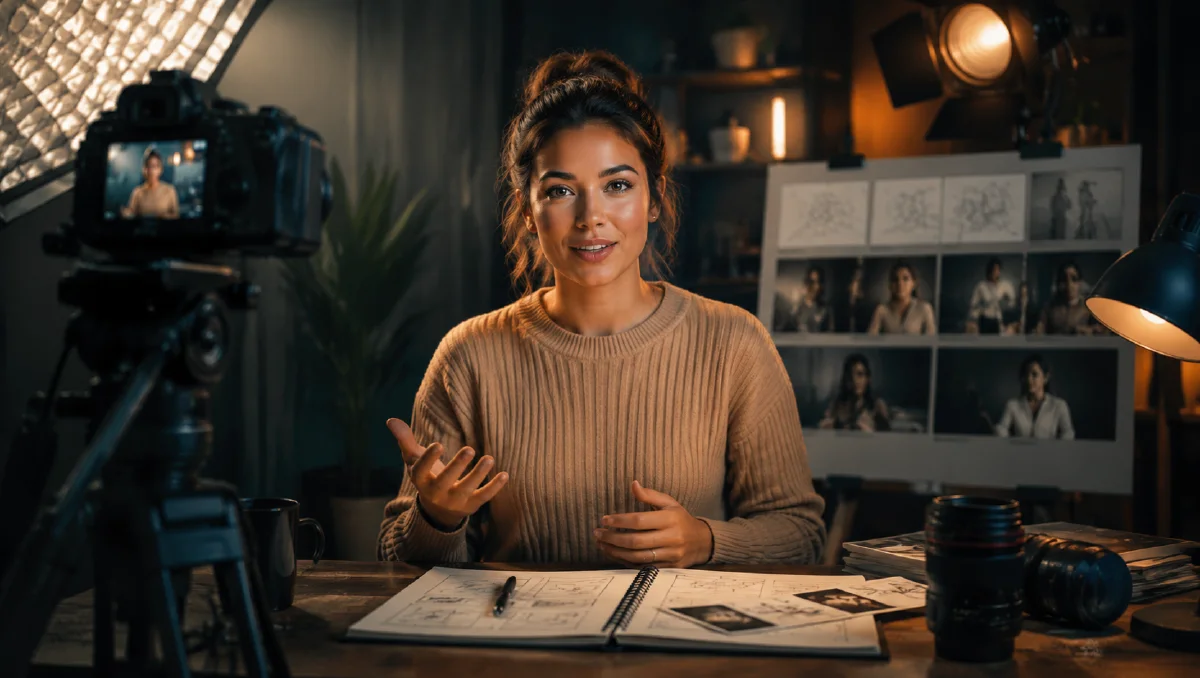
Many digital presenters fail because the base portrait looks like a formal headshot. For a knowledge account, aim for a tabletop creator frame: frontal camera, relaxed shoulders, hands resting naturally on the desk, soft eye contact, and a cozy background.
Use this planning prompt before generating the portrait:
Act as a creative director designing a warm, relatable knowledge creator.
Create three visual identity concepts for a tabletop half-body presenter.

Inputs:
Age: [age]
Gender presentation: [description]
Ethnicity or appearance notes: [description]
Hair: [description]
Topic niche: [education, wellness, finance, design, language learning, etc.]

Rules:
The creator should feel soft, grounded, and trustworthy.
Avoid cold corporate styling, dark formal suits, aggressive eye contact, sharp
glass offices, and luxury executive cues.
Use a frontal tabletop shot with relaxed shoulders and natural hands on the desk.
Lighting should be soft and warm, with the face brighter than the cozy background.

Return three concepts:
1. Cozy home guide
2. Soft academic
3. Clean natural creator
For each concept, describe wardrobe, background, lighting, expression, and camera.
Then turn the best concept into an image prompt for Naviya image generator:
Frontal tabletop portrait of a warm knowledge creator, relaxed shoulders,
hands naturally resting on a wooden desk, soft smile, clear eye contact,
cozy dim study corner behind them, warm desk lamp bokeh, soft window light on
the face, natural skin texture, clean comfortable wardrobe, realistic creator
setup, 4K, shallow depth of field, no formal suit, no cold office.
Step 2: Write for spoken delivery
Digital humans work best when the script sounds like someone explaining an idea to one person. Write short sentences. Add one pause after the hook. Give the presenter a reason to gesture.
Script structure:
- Hook: one clear tension or question.
- Definition: one sentence that answers the topic.
- Example: one practical use case.
- Checklist: three concrete steps.
- CTA: one light next action.
Example:
If your AI videos look polished but still feel fake, the problem may not be the
model. It may be the performance brief.

A performance brief tells the presenter how to move, pause, look, and react
while speaking. Before generating the clip, write the emotional beat of each
sentence.

For a product explainer, use three beats: start curious, become confident, then
end with a small smile. That gives the video a human arc instead of a flat read.
For more prompt structure, use structured JSON AI prompts or AI visual brief to prompt.
Step 3: Make voice direction specific
A good voice pass is not just language and gender. It needs cadence. Choose:
- Pace: calm, medium, energetic, or fast social.
- Emotion: reassuring, curious, thoughtful, excited, or practical.
- Texture: close microphone, clear studio, soft room tone.
- Pauses: before definitions, after important examples, before the CTA.
Voice direction template:
Voice style: warm educational creator, close microphone, clear articulation.
Pace: medium-slow for definitions, slightly brighter on examples.
Emotion: trustworthy, attentive, never salesy.
Pauses: brief pause after the opening hook and before the final CTA.
The voice should lead the face. If the audio is flat, the best portrait will still feel artificial.
Step 4: Add performance notes
Performance notes help the talking video model avoid random movement. Keep them readable and physical.
The presenter sits at a wooden desk and speaks directly to camera. They keep
gentle eye contact, nod once after the first sentence, use small hand gestures
near the tabletop during the checklist, and finish with a natural soft smile.
The shoulders stay relaxed. The background remains cozy and softly blurred.
For explainers, do not ask for wide movements. Small hands, head nods, and facial timing usually look more credible. If the clip is for a short ad, you can build the same identity into Naviya AI video ads.
Step 5: Assemble the final talking video
The assembly order should be:
- Generate or select the creator portrait.
- Produce the voiceover with the final script.
- Create the talking video using the portrait, audio, and performance notes.
- Review lip sync, eye stability, hand movement, and background consistency.
- Add captions only after the face and voice are approved.
If the mouth looks accurate but the person feels fake, regenerate with softer performance. If the face is warm but the speech feels synthetic, revise the audio direction before changing the portrait.
Content series ideas
The same digital creator can support a recurring channel if the format is consistent. Keep the presenter, desk, lighting, and opening rhythm stable, then rotate the topic type.
| Format | Best use | Prompt note |
|---|---|---|
| One-minute lesson | Teach one concept | Calm pace, one example, one recap |
| Myth vs fact | Correct a common misunderstanding | Curious expression, small hand contrast |
| Product explainer | Introduce a feature or offer | Keep gestures near the product area |
| Weekly briefing | Summarize updates | Slightly faster pace, confident tone |
| FAQ answer | Respond to audience questions | Warm eye contact, direct language |
For a knowledge channel, consistency is a trust signal. The audience should recognize the creator before reading the caption. Change the script and emotional beat, but do not redesign the presenter every week unless the brand intentionally has multiple hosts.
Quality checklist
- The portrait looks like a creator frame, not a passport photo.
- The background suggests a topic without becoming busy.
- The script has spoken rhythm and short sentences.
- The voice has real pauses and emotional contour.
- Gestures support the script instead of competing with it.
- The first three seconds communicate the topic clearly.
Try it in Naviya
Create the portrait in Naviya image generator, then bring the chosen frame into Naviya video generator or reference-to-video with your voice and performance notes. For explainers that need multiple hooks, duplicate the same creator identity and test different opening lines.
Reusable prompt pack
Creator portrait:
[Age and appearance] knowledge creator sitting at a desk, frontal tabletop shot,
relaxed shoulders, hands naturally on the desk, soft smile, warm cozy background,
face gently brighter than the room, natural skin texture, approachable wardrobe.
Talking performance:
The presenter speaks naturally to camera like a trusted creator explaining an
idea to one viewer. Small hand gestures, soft nods, attentive eye contact,
relaxed posture, realistic micro-expressions, warm educational tone.
Caption style:
Short sentence captions, high contrast, no clutter, key terms highlighted only
when they improve comprehension.