2026-06-12
AI Speaker Product Visuals: From Plain Cutout to Lifestyle Ad
Transform a plain speaker product image into warm lifestyle AI product visuals with scene building, light matching, and screen detail prompts.
Try this workflow in Naviya
Turn a product, hook, or campaign idea into short social-ready ad concepts.
Create video ad variants
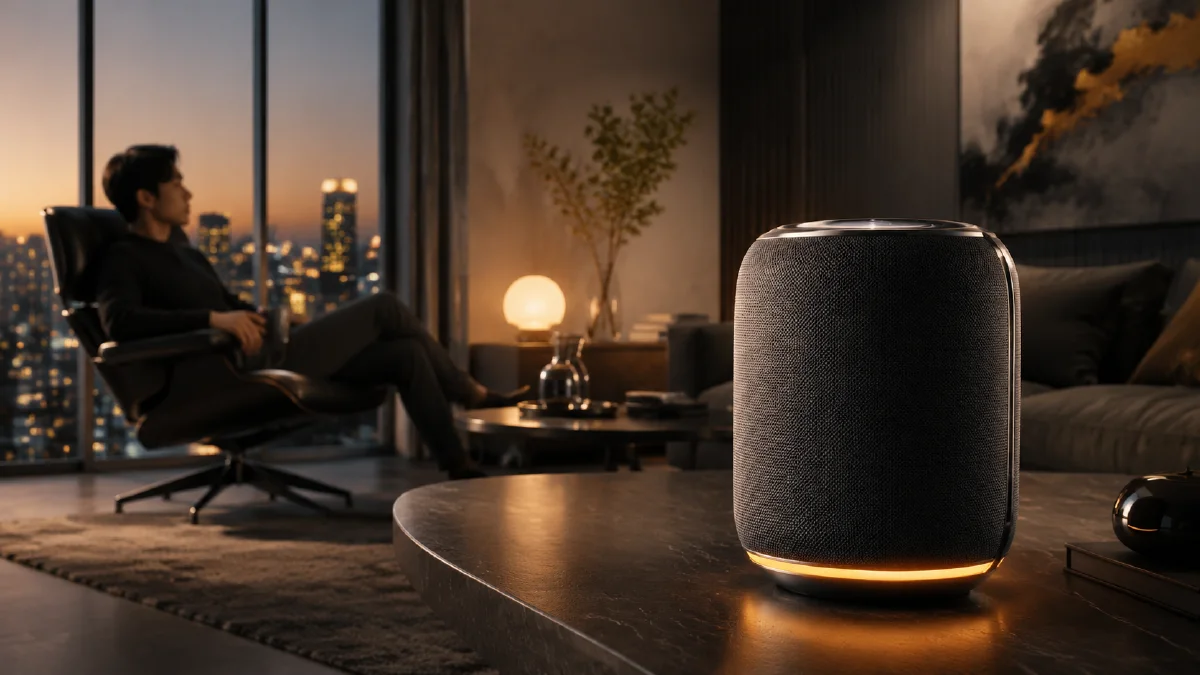
AI speaker product visuals are a useful example of a broader product CG problem: the source product may be clear, but the environment does not sell the feeling. Many product cutouts are photographed on white backgrounds with hard light, visible stripe shadows, or a flat ecommerce setup. That can be useful for catalogs, but it does not always communicate warmth, morning routines, music, or home atmosphere.
The stronger workflow is to build the scene first, then place the product into it with matching light. Use AI Image Generator to create the lifestyle background or the full product scene. If you already have a product image, use Image to Video after the speaker is integrated into the final frame. For full motion ads, use AI Video Generator. This article pairs well with AI Product Photography to Video, AI lighting prompts, and cinematic atmosphere prompts.
Diagnose the source image
Before changing the image, understand what is already working.
Strong source image qualities:
- clear product silhouette
- visible material texture
- accurate front or three-quarter angle
- no severe crop through the product
- enough resolution for detail
Common source problems:
- lighting does not match the desired scene
- background feels too cold or clinical
- shadow direction is too harsh
- product looks detached from the surface
- screen or control area is blank
The goal is not to throw away the source. It is to preserve the product and replace the context.
Build the empty lifestyle scene
If the final ad should feel like a warm morning bedroom, create that scene without the speaker first. This gives you more control over architecture, table placement, bedding, curtains, color temperature, and the direction of light.
Prompt example:
A warm morning bedroom scene with soft golden sunlight filtering
through sheer curtains, a clean wooden bedside table, cozy linen bedding
in neutral tones, minimalist Scandinavian interior design,
warm inviting atmosphere, cinematic soft lighting, photorealistic,
no electronics on the table.
The "no electronics" instruction matters. It keeps the table empty so the product can be placed later. If the model invents a lamp, phone, book, or cup, you can either accept it as context or regenerate for a cleaner surface.
Match the product to the new light
The most important step is light replacement. A speaker photographed under hard direct light will not automatically belong in a soft morning bedroom. The prompt should ask the model to keep product form and material, but rerender highlights and shadows according to the new environment.
Use:
Place the speaker product on the bedside table in this room.
Preserve the exact speaker shape, front grille, material texture,
proportions, and color. Rerender the speaker lighting to match the room:
warm morning light from the window, soft highlights on the body,
gentle shadow on the table, realistic contact shadow, no extra products.
This is much more precise than "make it realistic." Realism comes from contact shadow, direction, color temperature, and material response.
Add screen or interface detail
Many smart speakers, alarm speakers, and audio devices have a display or control surface. If that area is blank, the product can look inactive. Add only a simple detail.
Prompt addition:
On the speaker display, show a minimal time interface,
clean elegant typography, low brightness, matching the product design,
no clutter, no tiny unreadable text.
The interface should be quiet. The ad is not about the UI. It is about the product feeling alive in the scene. If the generated text is messy, treat the display as a placeholder and replace it later with real type.
Use light logic, not mood words
Lifestyle product prompts often overuse words like cozy, premium, beautiful, cinematic, and warm. These are useful but insufficient. Add physical lighting instructions:
- "golden sunlight from camera left"
- "soft shadow falling behind the product"
- "warm highlights on the top edge"
- "cooler ambient shadow under the table"
- "diffused window light through sheer curtains"
For a speaker, material readability matters. A fabric grille needs soft texture. A glossy display needs controlled reflection. A matte body needs a gentle gradient, not a harsh shine.
Create alternate environments
Once you have a reliable speaker placement workflow, you can create many campaign directions from the same product:
| Environment | Best message |
|---|---|
| Morning bedroom | calm routine, alarm, wellness |
| Kitchen counter | daily utility, family, voice assistant |
| Home office | focus, podcasts, productivity |
| Living room shelf | design object, music, ambience |
| Outdoor patio | portability, weekend lifestyle |
Do not change the product with every scene. Keep the speaker consistent and let the environment carry the campaign variation.
Turn the visual into video
Speaker videos can be elegant with very little motion. A morning light shift, curtain movement, display glow, and small camera push-in are usually enough.
Image-to-video prompt:
Animate this speaker lifestyle product image into a 6 second warm home ad.
Camera: slow push-in toward the speaker from the bedside table angle.
Lighting: morning sunlight gently shifts through sheer curtains.
Product: the speaker remains stable, with a subtle display glow.
Environment: soft fabric and curtain movement, calm bedroom atmosphere.
Constraints: preserve speaker shape, grille texture, screen area, color,
table contact shadow, and room layout. No extra products, no text changes.
If the speaker slides or changes shape, remove product motion entirely and animate only the light and curtains. For product ads, believable stillness often feels more expensive than obvious movement.
Avoid common integration failures
The most common failure is a floating product. The speaker may look placed on a table, but without contact shadow it will not feel physically present. Add "realistic contact shadow" and "speaker weight resting on the surface."
Another issue is mismatched color temperature. If the room is warm but the speaker has a cold white highlight, ask for "warm reflected light on the product body." If the product becomes too orange, ask to preserve product color while matching the scene's illumination.
Finally, do not ask for too many lifestyle props. A cup, book, plant, lamp, phone, and candle can make the product disappear. The room should make the speaker desirable, not compete with it.
Scene QA by channel
The same speaker visual should not be judged the same way for every channel. A marketplace image, landing page hero, and social video each need a different balance of product clarity and atmosphere.
| Channel | What matters most | Useful test |
|---|---|---|
| Marketplace gallery | product size, shape, and finish | crop to square and inspect the speaker edge |
| Landing page hero | mood plus readability | add headline-safe space and check contrast |
| Email banner | simple scene and fast recognition | view at small width before approving |
| Paid social | first-second interest | test a light sweep or room reveal |
| Product detail page | trust and accuracy | compare material against the original photo |
If the scene is for product inspection, remove extra props and keep the speaker large. If it is for lifestyle storytelling, keep the product anchored but let room light and user context explain the benefit. For a complete set, generate stills with AI Image Generator, then animate only the approved frames with Image to Video. If you need multiple ad hooks, adapt the best scene in AI Video Ads instead of asking every clip to do every job.
Try it in Naviya
In Naviya, generate or upload the clean speaker visual, then create a warm lifestyle scene in AI Image Generator. Use the approved frame in Image to Video for subtle camera and light movement. If you need a longer social ad, build a multi-shot sequence in AI Video Generator.
Good AI speaker product visuals are built by matching light. Once the product and room share the same illumination, the image stops looking like a cutout and starts feeling like a real ad.