2026-06-12
AI Phone Case CG Video Workflow for Ecommerce Product Ads
Create AI phone case CG videos with floating layouts, pastel product renders, first and end frames, ripple effects, and clean ecommerce motion.
Try this workflow in Naviya
Turn a product, hook, or campaign idea into short social-ready ad concepts.
Create video ad variants
AI phone case CG is ideal for ecommerce because the product is simple, colorful, and motion-friendly. A phone case can float, collide, stack, separate into layers, fall into liquid, or merge with another material without needing actors, locations, or complex storytelling. The risk is that the product becomes too playful and loses its material realism. A good workflow keeps the case shape, texture, and color stable while using motion to make the product line feel alive.
Use AI Image Generator to create clean phone case stills, Image to Video to animate approved frames, and AI Video Generator for the final sequence. For adjacent techniques, read Product Image to Video, AI Product Photography to Video, and AI lighting prompts.
Start with a clean product family image
Phone cases are often sold by color. The first image should show the family clearly: several cases, consistent shape, different colors, clean background, and soft shadow. Avoid busy backgrounds at the start. A pure white or very light gray studio setup lets the product colors do the work.
Prompt example:
A minimal product render of multiple colorful silicone smartphone cases
floating in mid-air, soft pastel colors including lavender, mint green,
peach, baby blue, pink, burgundy, and gray, clean white background,
modern aesthetic, soft studio lighting, high-quality product photography,
design-focused composition, matte texture, subtle shadows.
This prompt builds a sellable product image before any motion is introduced. The colors are specific, the material is clear, and the background is simple enough for ecommerce use.
Create vertical hero frames
A vertical floating composition is useful for TikTok, Reels, Shorts, product detail pages, and app store ads. Ask for order and symmetry rather than random floating chaos.
Prompt:
Multiple colorful matte silicone smartphone cases floating vertically
on a pure white background, each case aligned with clean spacing,
soft natural light, frosted texture, subtle embossed logo area,
minimal premium product photography, shallow depth of field,
high detail, elegant ecommerce layout.
If you need logo space, ask for "embossed logo area" rather than generated text. Add real brand marks later.
Isolate the hero case
For a video sequence, you often need one case isolated from the lineup. This becomes the product anchor for ripple shots, material breakdowns, and final hero frames.
Useful edit instruction:
Keep only the central pink smartphone case. Remove all surrounding cases.
Preserve the case shape, matte silicone texture, camera cutout,
embossed logo area, soft shadow, and pure white background.
The isolated case can be reused across multiple clips, which helps the edit feel consistent.
Build motion ideas from product properties
Phone cases are protective, flexible, colorful, tactile, and often layered. Motion should express those qualities.
| Motion idea | Product meaning |
|---|---|
| Gentle floating | light, playful, clean product family |
| Cases collide and fly upward | social energy, colorful collection |
| Case falls into matching liquid | soft silicone, color richness |
| Three cases merge into one | material fusion, feature summary |
| Exploded layers separate | protection, construction, engineering |
Do not use all of these in one clip. Build a short campaign from several simple shots.
First-frame video prompts
First-frame prompting lets the model extend a still image into motion. It works well for a clean floating lineup.
Prompt:
Multiple colorful matte smartphone cases floating slowly against
a pure white background. Soft lighting, clean product photography style,
hyper-realistic silicone texture, subtle shadows, cinematic composition.
The cases move gently in place with a light upward drift.
Preserve the shape, color, spacing, and matte material of every case.
For a more energetic opener:
Multiple colorful matte smartphone cases floating against a pure white background.
The cases gently collide, separate, then drift upward out of the frame.
Soft studio light, clean ecommerce product style, realistic shadows,
smooth motion, no deformation, no extra cases, no generated text.
The collision should be gentle. If the cases bend or melt unintentionally, reduce the action to a simple drift.
First and end frame transitions
First and end frame control is useful when you want a clear transformation. For example, the cases can enter from below, surrounding cases can disperse while the main case remains, or three material versions can merge into one.
Prompt:
Video with start and end frames: multiple matte smartphone cases
in soft colors slowly float up from the bottom into a clean white frame.
Smooth animation, soft lighting, realistic product texture,
the cases remain rigid and preserve their shape, elegant ecommerce motion.
For a central hero:
Video with start and end frames: six surrounding phone cases slowly disperse
outward while the central peach case floats gently in place.
Pure white background, soft shadows, premium product photography,
clean motion, central case remains sharp and unchanged.
This creates a simple story: collection first, hero product second.
Use liquid and exploded views carefully
A silicone case falling into matching liquid can look premium if the physics are calm. It can look messy if the splash is too large.
Prompt:
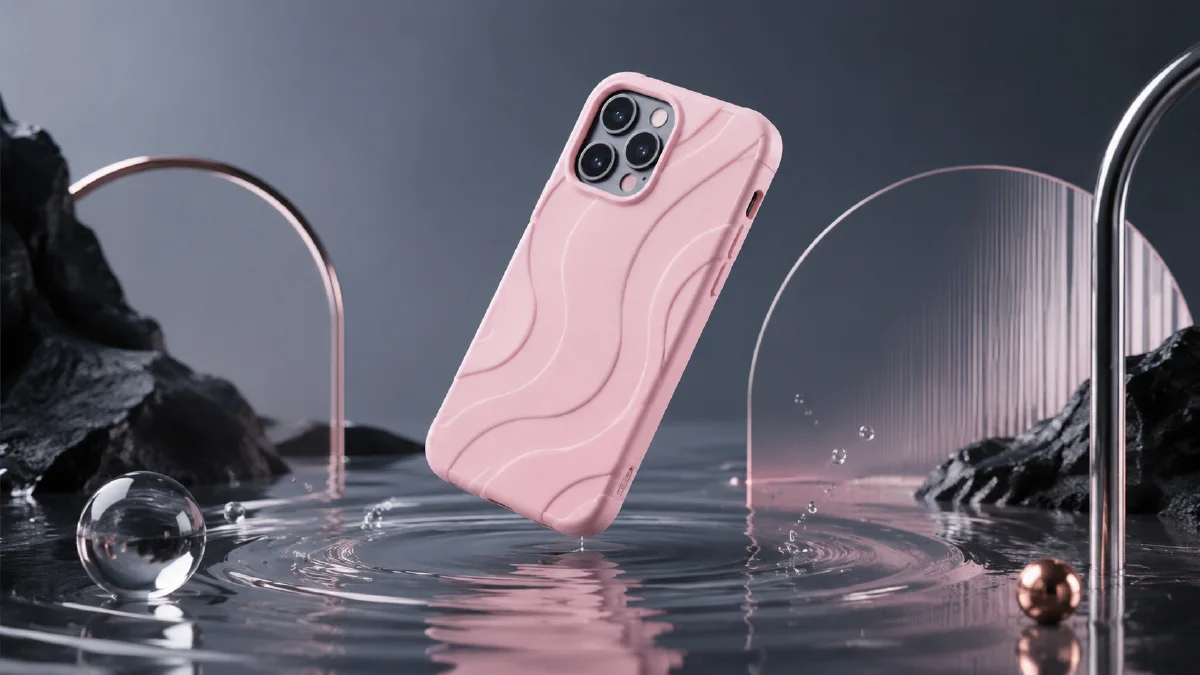
A matte pink smartphone case gently falls onto a pool of matching pink liquid,
creating soft circular ripples, no splash explosion, pure white background,
hyper-realistic silicone texture, elegant product photography,
smooth slow motion, preserve the case shape and camera cutout.
For exploded views, name the layers:
Exploded product view of one smartphone case, three vertical layers separated:
outer matte silicone layer, transparent protective layer, soft inner lining,
pure white background, precise alignment, premium technical product render.
This direction is better for a still frame or a very short technical animation.
Campaign asset map
A phone case campaign usually needs more than one CG clip. Plan a small asset map so the same visual system can serve a product page, paid ad, and social post.
| Asset | Use | Prompt priority |
|---|---|---|
| Family lineup | Collection page, launch post | color consistency, equal spacing, clean shadows |
| Single hero case | Product card, ad opener | exact camera cutout, button shape, material finish |
| Macro detail | Feature section | edge protection, texture, lens ring, corner thickness |
| Motion clip | Paid social | one action: float, rotate, snap-on, or light sweep |
| End frame | Retargeting and product page | readable product, caption-safe space |
The main risk is letting motion turn the case into a generic glossy object. Protect the phone cutout, camera ring, button areas, thickness, and color. If the product line has multiple colors, generate stills first and use the approved colors as references. Then animate only one hero color at a time.
For stronger ecommerce coverage, pair this workflow with product image to video when you already have a clean case photo, or AI Video Ads when the goal is hook testing. Keep liquid, particles, and exploded views as optional accents. The product should remain the clearest object in every frame.
Try it in Naviya
Generate the phone case family in AI Image Generator, select the cleanest lineup, then isolate one hero case for detail shots. Use Image to Video for floating, ripple, and merge clips. Use AI Video Generator when you want to assemble a complete ecommerce product ad.
The best AI phone case CG video uses simple motion, stable materials, and confident color. Let the case stay recognizable while the animation makes the product line feel active.