2026-06-12
AI Pet Portrait Prompts for Clean ID Photos and Memorial Posters
Write AI pet portrait prompts for professional ID-style photos, clean backgrounds, adorable expressions, and polished poster variations.
Try this workflow in Naviya
Use the guide to shape a still image, then keep it as a first frame or campaign asset.
Open the studio
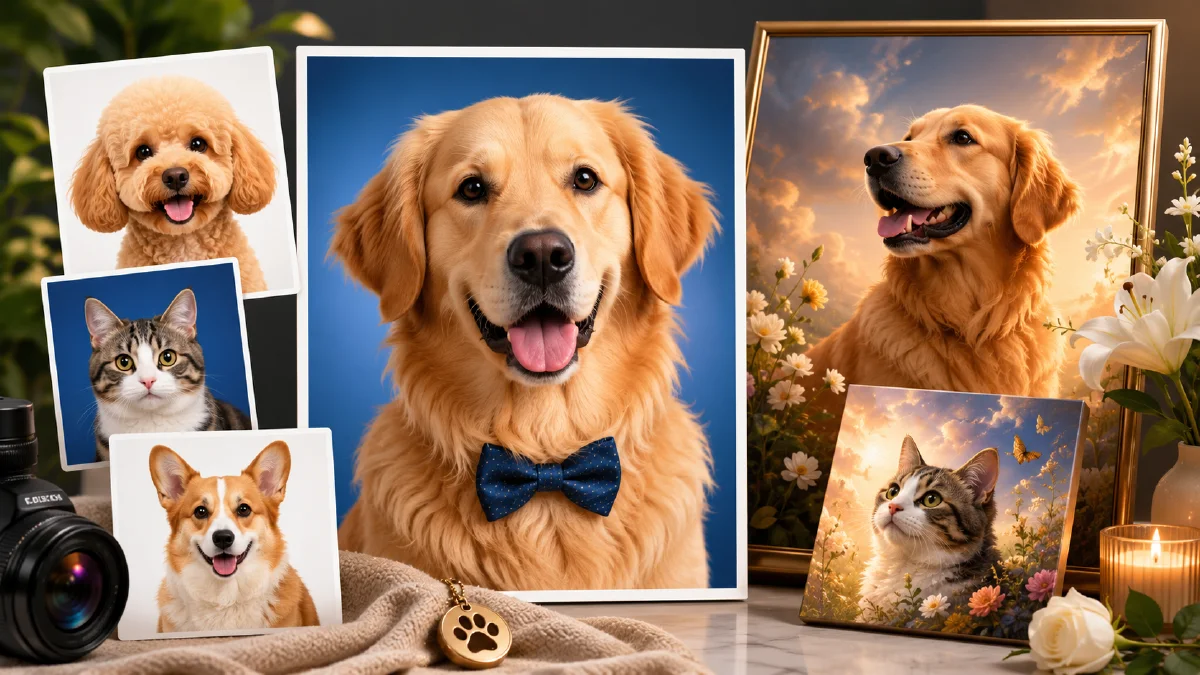
AI pet portrait prompts work best when they start from a real pet reference and aim for a clear photographic format. A pet ID photo is a surprisingly useful target: front-facing, eye-level, clean background, even lighting, centered composition, and sharp fur detail. Those constraints help the model preserve identity instead of drifting into a generic cute animal.
Use AI Image Generator to create the portrait still. If you want a short animated keepsake or social clip, use Image to Video after choosing the strongest portrait. For a broader memorial or adoption campaign video, use AI Video Generator. For additional control, combine this guide with realistic AI portrait prompts, reference image prompting, and AI lighting prompts.
Choose the right reference photo
The prompt can only protect details that the reference photo makes visible. A pet photo with motion blur, side lighting, heavy shadow, or a hidden face will produce weaker results. Before generating, take or choose a photo that gives the model clean identity information.
Best reference qualities:
- pet facing the camera
- eyes visible and sharp
- head, chest, and upper body included
- even lighting on the face
- no object covering the ears, nose, or fur pattern
- natural sitting or standing posture
You do not need a full-body image for an ID-style portrait. In fact, full-body references can dilute the face. The best crop includes the face, neck, chest, and a little shoulder shape.
Use an ID-photo structure
A pet ID photo prompt is not a passport specification. It is a composition strategy. It tells the model to make the image clean, direct, and usable.
Core prompt:
Professional high-quality pet portrait in an ID photo style,
clean solid white background, professional studio lighting,
front-facing at eye level, natural sitting pose,
head, chest, and upper body visible, not full body,
detailed facial features, adorable calm expression,
sharp fur detail, centered symmetrical composition,
clear balanced framing, high resolution.
The important phrases are "front-facing," "eye level," "head, chest, and upper body," and "clean solid white background." These make the portrait feel intentional rather than like a random pet snapshot.
Keep the pet's identity stable
If the pet has distinctive markings, name them in the prompt:
preserve the pet's white muzzle, dark ear tips, amber eyes,
fluffy chest fur, and small black nose
For a cat:
preserve tabby stripes, round green eyes, white paws,
soft cheek fur, and the exact face pattern from the reference
For a dog:
preserve tan eyebrows, white chest, floppy ears,
short smooth fur, and the exact muzzle shape from the reference
Do not overload the prompt with every hair detail. Pick the features the owner would recognize immediately.
Control the background
White backgrounds are useful because they make the portrait easy to crop, print, or place into a poster. If the background is not clean enough, tighten the instruction:
pure white background, minimum shadow, clean cutout-ready edges,
no props, no collar, no furniture, no extra animals
If the pet looks too flat against white, allow a soft studio shadow:
clean white studio background with a very soft floor shadow,
natural depth, no clutter
For a more designed portrait, replace the white background after the ID image is stable:
minimal pastel blue gradient background, soft light,
clean studio portrait, centered pet, gentle shadow,
premium memorial poster style
This two-step process is safer than asking for a complex poster immediately.
Build poster variations from the clean portrait
Once you have a clean pet cutout, you can create many poster styles:
| Poster style | Prompt direction |
|---|---|
| Minimal keepsake | pastel gradient, name space, soft shadow |
| Birthday poster | warm confetti shapes, clean title area |
| Adoption profile | friendly studio portrait, white background |
| Memorial print | gentle light, muted color, elegant negative space |
| Social avatar | centered close-up, bright background, crisp eyes |
If real text is needed, ask for space for typography instead of generated writing:
large clean space above the pet for real name typography,
no generated text, balanced poster composition
This avoids distorted letters and gives the final design a professional finish.
Animate the portrait gently
Pet portraits can be animated, but restraint matters. Do not ask for running, jumping, or complex head movement from one still reference. Use subtle motion: blinking, breathing, soft fur movement, or a gentle camera push-in.
Image-to-video prompt:
Animate this pet portrait into a 5 second gentle keepsake video.
Camera: very slow push-in.
Pet motion: subtle breathing, tiny blink, calm expression.
Lighting: soft studio light remains stable.
Background: clean white background with a slight warm glow.
Constraints: preserve the pet's face, eye color, fur markings,
ear shape, muzzle, and body proportions. No extra animals,
no collar changes, no exaggerated movement.
If the animation changes the pet's identity, remove facial motion and animate only the camera or background.
Common pet portrait mistakes
The biggest mistake is using a reference photo where the pet is not clearly visible. The second biggest is asking for too much style too early. Oil painting, royal costume, fantasy background, cinematic lighting, and poster typography can all be fun, but they can also erase the pet's real identity.
Start clean. Approve the face. Then stylize.
Also avoid extreme adjectives like "most adorable ever" or "super cute masterpiece." They do not help identity control. Use photographic instructions, visible details, and background constraints.
Client-ready pet portrait workflow
Pet portrait work is easiest when you separate identity capture from style exploration. First, create a clean ID-photo-style portrait that proves the pet is recognizable: face shape, ear position, eye color, muzzle markings, fur length, and any distinctive patches. Do not add props or costumes in this first pass. If the clean portrait is wrong, every poster, badge, sticker, or animation variation will inherit the wrong identity.
Second, create a style grid from the approved portrait. Keep one variable per row: background color, lighting, outfit, illustrated texture, or poster layout. This makes review much easier for a pet owner or brand manager because they can say "keep the blue background, change the bow tie" instead of rejecting the whole set. Third, prepare final formats. A square avatar needs a centered face and readable eyes. A product insert needs more empty space for copy. A memorial or adoption poster needs a softer expression and calmer background.
The biggest failure mode is charm replacing likeness. A generated pet can look adorable while no longer looking like the real animal. Review outputs at thumbnail size and full size. Check the eye spacing, nose shape, fur markings, and ear silhouette before judging style. Use the AI image generator for the clean portrait, then create gentle movement with image to video only after the identity is stable. For adjacent identity-control workflows, see realistic AI portrait prompts and reference image prompting.
Try it in Naviya
Upload or describe a clear pet reference in AI Image Generator, then generate a clean ID-style portrait first. Use Image to Video only after the still image preserves the pet's identity. For a complete keepsake, adoption, or memorial clip, build a short sequence in AI Video Generator.
Good AI pet portrait prompts respect the original animal. The cleaner the structure, the more personal the final image feels.