2026-06-12
Cyber Fitting Black Suit Video Workflow
Use a full black zentai-style stand-in to create cyber fitting clothing videos with virtual try-on, simple motion templates, and beat-based editing.
Try this workflow in Naviya
Turn a product, hook, or campaign idea into short social-ready ad concepts.
Create video ad variants
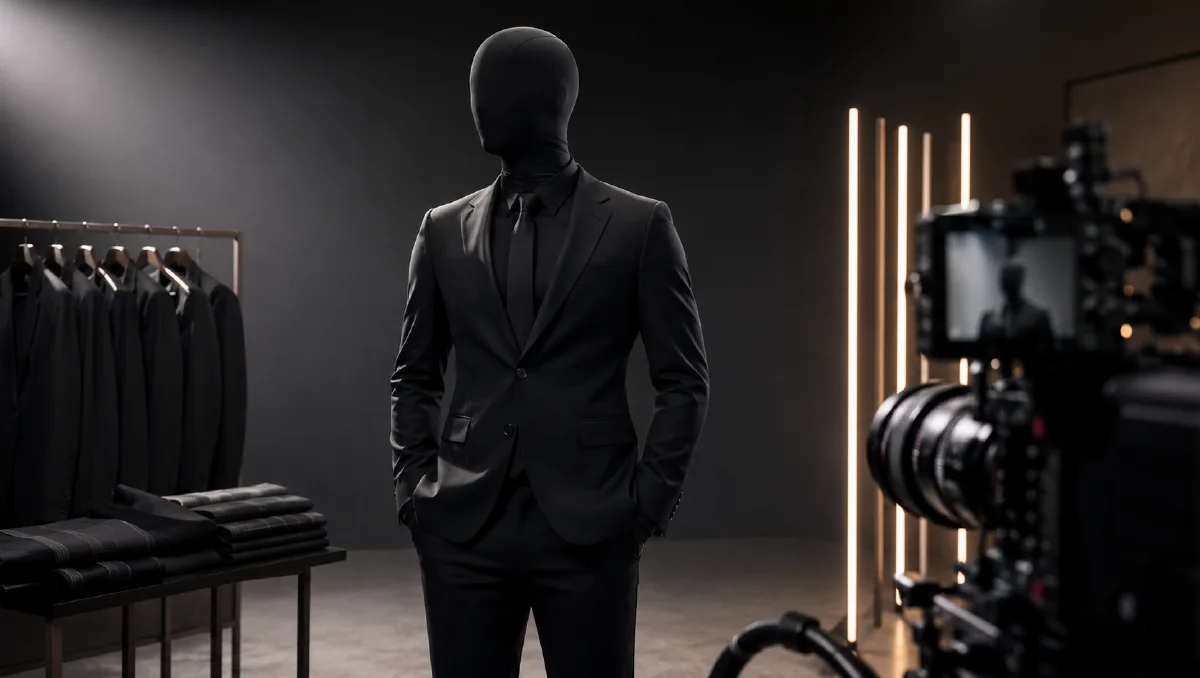
Cyber fitting videos use a covered full-body stand-in to show clothing without putting a real person on camera. The black suit creates a neutral body shape, the clothing becomes the visual focus, and the final video can feel rhythmic, mysterious, and product-led. This format is especially useful for fashion sellers who need quick outfit display content without casting or filming.
The workflow is simple: create a realistic black-suit base, apply clothing through virtual try-on, animate with restrained actions, then cut to music. For related virtual try-on systems, see AI apparel model workflow, clothing UGC video replication workflow, and AI fashion product video workflow.
What is cyber fitting?
Cyber fitting is a clothing presentation style where a model-like stand-in wears the product while the body underneath is hidden. The viewer focuses on garment silhouette, fabric drape, outfit pairing, and movement.
It works because it removes some distractions:
- No face identity issue.
- No styling conflict from skin or hair.
- Product color and shape stand out.
- One stand-in can display many outfits.
- The visual language feels modern and scroll-stopping.
The risk is that the figure can look too fake. The base image must have realistic body volume, posture, lighting, and room texture.
Step 1: Create the black-suit base
Use Naviya image generator to create a full-body stand-in.
Prompt:
Full-body shot of a young male model wearing a matte black full-body zentai-style
suit that covers head, face, hands, and feet with no visible skin. Realistic body
volume with fit physique and slight natural softness at the waist, relaxed
posture, hands in pockets, leaning slightly against a wooden door frame.
Wide-angle 9:16 vertical framing, entire figure visible head to toe, feet on the
floor. Modern home entryway, beige walls, light oak floor, minimal shoe bench,
soft diffused morning light through sheer curtains, authentic smartphone photo,
neutral warm tones, sharp focus, no cropped head, no cropped feet.
Key details:
- "Matte" prevents the suit from becoming glossy latex.
- "No visible skin" keeps the format clean.
- Natural body volume makes the clothing fit more believable.
- Full body visibility helps later try-on.
Step 2: Apply the outfit
Upload the clothing reference and dress the stand-in:
Put the full outfit from the clothing reference onto the black-suit model.
Natural standing posture. Preserve garment color, silhouette, fabric texture,
logo placement, pocket position, zipper, buttons, and layering. The black suit
remains visible only where the outfit does not cover the body. Same entryway,
same light, same camera framing.
Generate multiple stills:
- Natural standing front.
- Arms crossed.
- Hands in pockets.
- Slight side angle.
- Leaning against door frame.
- Close-up of garment detail.
If the clothing becomes too flat, add:
Fabric has real weight and drape, visible folds at elbows, waist, and knees,
natural shadows where garments layer over the body.
Step 3: Use simple motion templates
Cyber fitting videos do not need complex acting. The covered figure should move like a mannequin with attitude.
Template A:
The model starts standing naturally, then crosses arms, opens both hands palm-up
in a relaxed display gesture, and leans back against the door frame. Camera is
mostly locked with slight handheld motion. Outfit details remain stable.
Template B:
The model starts with arms crossed, then lowers both hands into pockets while
leaning casually against the door frame. Subtle head tilt, small body shift,
same room, same lighting, no text.
Template C:
The camera slowly moves from full body to mid shot as the model turns slightly
to show the side silhouette. Clothing folds and layers move naturally.
Use Naviya image-to-video for these clips. If the outfit must match across multiple clips, use reference-to-video.
Step 4: Cut to rhythm
The black-suit format works well with strong beats. Suggested edit:
- Full-body reveal.
- Arm-cross pose on beat one.
- Hand-open display on beat two.
- Side turn or pocket action.
- Detail close-up.
- Final full-body pose.
Do not overcut before the product registers. Each shot needs enough time for the shopper to read fit and silhouette.
Use AI video ads prompts if you want stronger hook structures for paid social.
Cyber fitting prompt template
Base:
Full-body matte black covered stand-in, no visible skin, realistic body volume,
natural posture, simple home or studio environment, vertical smartphone framing.

Try-on:
Dress the stand-in in [product/outfit]. Preserve [color, fabric, logo, pockets,
buttons, zippers, silhouette]. Keep base identity, room, lighting, and full-body
framing consistent.

Motion:
[One action]. Keep outfit stable, body realistic, camera simple, no text, no
extra people, no scene change.
Troubleshooting
| Problem | Fix |
|---|---|
| Stand-in looks plastic | Ask for matte fabric, natural smartphone light, and realistic body softness |
| Outfit floats | Add natural shadows and garment weight |
| Hands distort | Keep hands covered and use simple gestures |
| Product details change | Repeat preservation rules and use cleaner clothing references |
| Video feels empty | Add beat cuts and one close-up detail shot |
Best products for the format
Cyber fitting is strongest when silhouette matters. It is especially effective for:
- Oversized jackets.
- Utility vests.
- Hoodies.
- Technical pants.
- Matching sets.
- Dark or high-contrast streetwear.
It is less effective for products that need skin tone, hair styling, or facial emotion to sell, such as makeup, earrings, eyewear, or neckline-focused jewelry. For those categories, use a natural model workflow instead.
Multi-outfit drop structure
For a product drop, keep the same stand-in and room across every outfit:
| Clip | Action | Product focus |
|---|---|---|
| 1 | Natural stand | Full silhouette |
| 2 | Arms cross to open hands | Front detail |
| 3 | Hands in pockets | Fit and attitude |
| 4 | Side turn | Layering and drape |
| 5 | Detail push-in | Hardware or fabric |
This makes the feed feel like a designed system. The shopper learns the viewing language once, then compares products faster.
Lighting and background choices
The black suit absorbs light, so the background should not be too dark. Use beige walls, oak floors, grey concrete, or a clean studio gradient. Add side light or soft window light so the suit keeps body shape. If the suit becomes a flat silhouette, the clothing will look pasted on top.
For streetwear, a home entryway works because it feels casual and repeatable. For premium outerwear, try a simple grey studio or concrete corridor. For outdoor gear, use a clean gear-room setup rather than a complex landscape. The stand-in format is strongest when the room is quiet and the outfit is the main event.
Safety for product comparison
When comparing multiple outfits, keep camera height, distance, and pose consistent. If one product is shown from a low hero angle and another from a straight view, the comparison becomes unfair. Use the same base pose for catalog comparison and reserve dynamic motion for social edits.
Try it in Naviya
Create the black-suit base in Naviya image generator, apply outfits as stills, then animate selected poses with image-to-video. For multi-outfit drops, use Naviya AI video ads to create several short variations from the same base.
Final checklist
- Full body is visible in the base image.
- The suit hides face, hands, and feet cleanly.
- Clothing details remain product-accurate.
- Motions are simple and repeatable.
- The edit includes both silhouette and detail.
- The final clip feels like a clothing display, not a costume gag.
Cyber fitting is strongest when it treats the stand-in as a neutral product tool. Let the outfit carry the personality.