2026-06-12
AI Sneaker CG Ad Workflow: From Product Beauty Shot to Motion
Create a sneaker CG ad with AI using product beauty shots, cushioning details, scene variants, image-to-video motion, and commercial editing.
Try this workflow in Naviya
Start from a finished image when the subject, style, or composition should stay stable.
Animate a still image
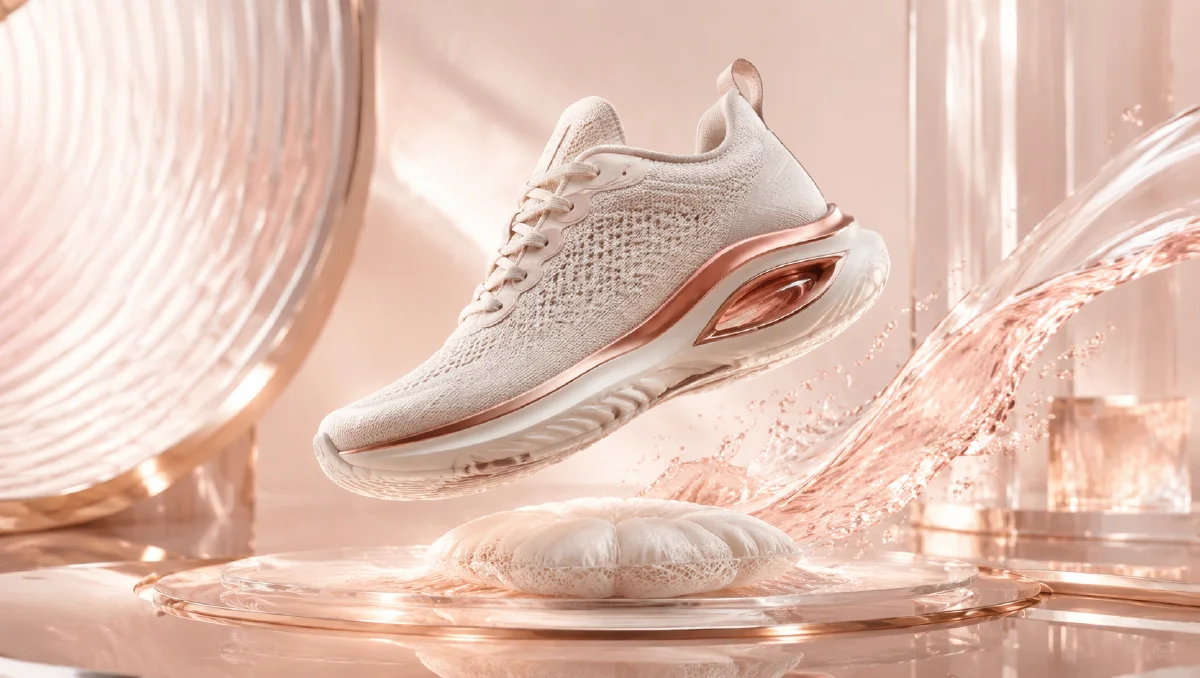
A sneaker CG ad is built on product detail. The viewer needs to feel the material, understand the silhouette, notice the sole technology, and remember the colorway. AI can generate striking footwear scenes, but the workflow must protect the shoe's shape and design features from shot to shot.
The practical definition: an AI sneaker CG ad is a short product video made from generated footwear beauty shots, scene variations, and image-to-video motion. It can look like studio photography, sports campaign footage, or stylized CG depending on the brand direction.
For more product video fundamentals, read AI product photography to video. For campaign prompt ideas, use AI video ads prompts. If you need a specific shoe to remain accurate, follow reference image prompting.
Start with the product beauty shot
The first image should be clean and controlled. A white background product shot helps establish the shoe before you create more dramatic scenes.
Prompt template:
Gray performance sneaker with visible cushioning columns and metallic silver side detail,
rich mesh upper texture, pure white clean background,
single shoe slightly tilted and floating, centered composition,
soft shadow below, close-up product photography style,
gray main color with silver and white accents,
high-definition photorealistic commercial advertising texture.
This prompt defines the subject, feature details, environment, composition, color, and render quality. It also avoids unnecessary background elements. The first job is to make the shoe look real and desirable.
Six dimensions to control
| Dimension | What to specify |
|---|---|
| Subject | shoe type, silhouette, feature details |
| Environment | white studio, track, city, abstract CG space |
| Composition | floating, side view, three-quarter view, macro |
| Color | dominant color and accent palette |
| Material | mesh, rubber, metallic, suede, translucent sole |
| Rendering | photorealistic, commercial, high detail, controlled shadow |
If a shot fails, identify which dimension was weak. For example, if the shoe loses its cushioning structure, strengthen the subject detail. If it feels cheap, improve material and lighting.
Build scene variants
After the beauty shot, create several environment directions:
| Scene | Use case | Prompt idea |
|---|---|---|
| White studio | product clarity | floating shoe, clean shadow, close-up |
| Dark CG tunnel | performance energy | light trails, reflective floor |
| Track surface | athletic credibility | textured rubber, motion dust |
| Urban wall | lifestyle appeal | concrete, shadow, street style |
| Macro material | product proof | mesh, sole, stitching detail |
Do not use every scene in one ad. Pick three that support the campaign mood.
Motion prompts
Studio rotation:
The gray performance sneaker floats in place and rotates slowly by a few degrees.
Soft light moves across the mesh upper and metallic side detail.
The shoe shape and cushioning columns remain stable.
Camera locked, pure white background, clean commercial product motion.
Performance reveal:
The sneaker lands lightly on a dark reflective athletic surface.
Subtle dust and light ripple outward from the sole.
Camera pushes in from low angle, premium sports CG style.
Shoe shape remains stable, no extra shoes, no logo imitation.
Macro detail:
Extreme close-up of the mesh upper and sole cushioning.
Camera glides slowly along the side of the shoe.
Highlights reveal texture detail, background softly blurred.
No warping, no changing materials.
One shoe, one movement, one surface. That rule keeps the clip from becoming visually noisy.
Preserve the shoe design
Footwear is easy for AI to distort because laces, mesh, soles, and logos contain many small details. Add constraints:
Preserve the shoe silhouette, sole structure, lace placement, mesh texture, and colorway.
Do not add extra logos, extra laces, duplicate shoes, or warped sole shapes.
Keep the product clean and centered.
If the ad represents a real product, use a reference image and avoid generated brand marks. If it is a concept sneaker, you can be more exploratory.
Edit a 12-second sneaker ad
| Time | Shot |
|---|---|
| 0-2 seconds | floating beauty shot |
| 2-4 seconds | macro mesh detail |
| 4-7 seconds | sole or cushioning reveal |
| 7-10 seconds | performance landing or lifestyle scene |
| 10-12 seconds | final hero frame |
Sound design can include a soft whoosh, low bass hit, rubber contact, or clean electronic beat. Keep the final frame still enough for the viewer to remember the silhouette.
Build around one signature feature
A sneaker ad becomes easier to remember when it highlights one signature feature. That might be cushioning columns, a sculpted sole, a translucent air pocket, a metallic side detail, a knit upper, or a distinctive heel shape. Put that feature in the prompt for every shot, not only the macro view.
Example feature block:
Signature detail: visible cushioning columns under the heel, silver side detail,
rich gray mesh upper, clean white midsole.
Add this block to studio, landing, macro, and final hero prompts. It acts like a product memory anchor. Even when the background changes, the viewer keeps seeing the same design reason to care.
Make motion match performance level
A lifestyle sneaker can use soft walking motion, a street shadow, or a relaxed rotation. A performance sneaker can use a low-angle landing, controlled dust, and sharper lighting. A luxury fashion sneaker can use a slower studio orbit and fewer athletic effects. Matching motion to product category prevents the ad from feeling overbuilt.
If the shoe is floating, give it a reason: product beauty shot, design reveal, or CG studio display. If it lands on a surface, keep the impact believable and avoid exaggerated shockwaves unless the campaign is intentionally stylized.
Plan stills for commerce too
A sneaker campaign often needs more than the video. While generating frames, save a clean side view, a three-quarter hero, a sole-detail crop, and a material macro. These can support product pages, email, thumbnails, and retargeting ads. The video may create attention, but the stills help shoppers inspect the design.
For commerce images, reduce dramatic shadows and keep the shoe readable. For brand-film images, you can use stronger contrast and more stylized motion. Separating these uses keeps the campaign practical.
If the campaign includes multiple colorways, build one master shot list first and then swap the color prompt. This keeps the edit consistent while letting each colorway feel like part of the same product family.
Prompt modifiers
| Need | Add |
|---|---|
| More premium | "controlled studio highlights, clean reflective surface, refined shadow" |
| More athletic | "low-angle performance lighting, dynamic surface dust, sharp contrast" |
| More texture | "rich mesh upper detail, rubber grain, precise stitching" |
| More CG | "high-end product CG render, polished reflections, dramatic light sweep" |
| More stability | "shoe shape remains unchanged, no morphing, no extra shoes" |
Use these modifiers as targeted fixes instead of stacking them all at once.
Try it in Naviya
Create the hero shoe shot and scene variants in Naviya Image Generator. Animate approved frames with Naviya Image to Video. Use Naviya Reference to Video when the shoe must match a real product, and test short paid-social versions in Naviya AI Video Ads.
Final checklist
Before shipping, review:
- The shoe silhouette is stable across all clips.
- The main design feature is visible.
- Colorway remains consistent.
- Backgrounds support the shoe rather than overpowering it.
- Motion feels premium and controlled.
- No accidental brand marks or fake readable text appear.
A sneaker CG ad works when the product feels engineered and desirable. Start with a clear beauty shot, expand into only the scenes that support the campaign, and keep every motion prompt centered on preserving the shoe.