2026-06-12
AI Helmet Product Video Workflow for Cinematic CG Ads
Create cinematic AI helmet product videos with desert scenes, sci-fi materials, controlled still frames, and image-to-video motion prompts.
Try this workflow in Naviya
Turn a product, hook, or campaign idea into short social-ready ad concepts.
Create video ad variants
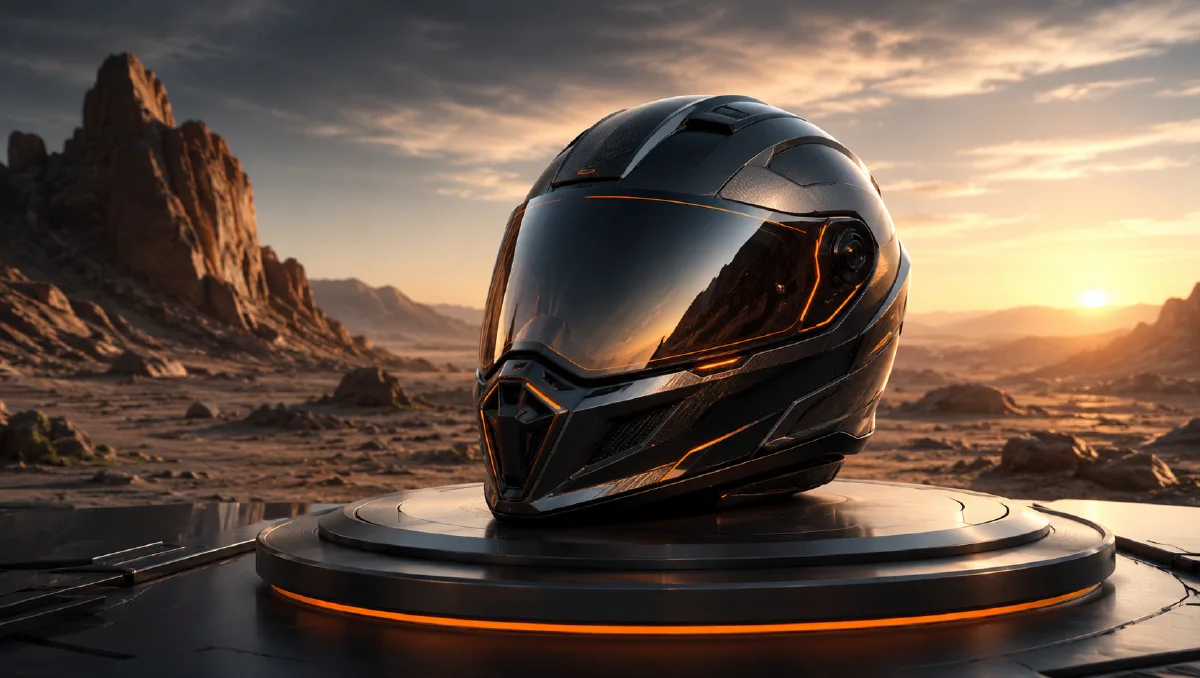
AI helmet product video is a strong use case for cinematic product CG because a helmet has a bold silhouette, reflective surfaces, safety meaning, and natural links to speed, terrain, and adventure. The same product can live in a desert, forest road, rainy city, or studio launch scene. The challenge is to keep the helmet design stable while the environment becomes dramatic.
Use AI Image Generator to make the core still frames, Image to Video to animate the approved helmet image, and AI Video Generator to build a multi-shot campaign. For supporting craft, read Product Image to Video, AI lighting prompts, and cinematic atmosphere prompts.
Start with one hero helmet
The first frame should establish the helmet's exact look. Use a clear colorway, front or three-quarter angle, and material details. If the helmet changes every time the scene changes, the campaign will feel inconsistent.
Prompt example:
A futuristic white and orange motorcycle helmet floating above warm desert dunes,
cinematic sunlight, fine sand particles in the air, surreal poetic atmosphere,
detailed visor and shell textures, sci-fi product aesthetic, hyper-realistic,
minimal composition, shallow depth of field, premium helmet product CG.
This prompt works because it balances product and atmosphere. The helmet is named first. The desert supports the concept. Fine sand particles add motion readiness without hiding the product.
Break the prompt into six dimensions
For helmet CG, use the same six-part product system:
| Dimension | Example |
|---|---|
| Subject | futuristic white and orange motorcycle helmet |
| Details | visor reflection, shell seams, vent lines, texture |
| Environment | warm desert dunes, dusk road, rainy city |
| Style | sci-fi, poetic, premium product photography |
| Composition | minimal, floating, centered, shallow depth |
| Render | hyper-realistic, detailed material, crisp light |
If a result feels generic, strengthen the subject details. If it feels too static, improve the environment and particles. If it feels like concept art instead of a product ad, add "commercial product photography" and "clean product silhouette."
Build environment variants
Once the helmet design is stable, create scene variants with the same product:
| Scene | Mood | Motion idea |
|---|---|---|
| Desert dunes | heat, endurance, surreal premium | sand particles, slow orbit |
| Golden-hour road | freedom, travel, natural warmth | camera push-in, sun flare |
| Rainy city | protection, speed, night energy | wet reflections, neon light |
| Mountain forest | adventure, safety, ruggedness | mist movement, side pan |
| Dark studio | launch, technology, precision | rim light sweep, platform turn |
Each environment should sell a different reason to care. The desert says endurance and futuristic adventure. The studio says engineering and premium materials.
Protect the helmet during image generation
Helmet designs are easy for AI to distort. Vents may multiply, visors may become asymmetrical, and stripes can drift. Add constraints early:
Preserve a clean symmetric helmet shape, one continuous visor,
accurate vent placement, white and orange shell panels,
no extra logos, no face visible inside, no duplicate helmets.
If the helmet is shown floating, ask for a subtle shadow or environmental grounding:
soft shadow on the sand below, believable weight, product centered
Even surreal product CG needs physical cues.
Animate the desert hero shot
The desert helmet frame can become a strong 6 second product video. Use a small camera move and environmental motion.
Prompt:
Animate this futuristic helmet product image into a 6 second cinematic ad.
Camera: slow orbit from front-left to center with a gentle push-in.
Product: the helmet floats steadily and remains unchanged.
Environment: fine sand particles swirl softly around the helmet,
warm desert light shifts across the visor and shell.
Atmosphere: premium sci-fi adventure, poetic and minimal.
Constraints: preserve helmet shape, visor, vents, white and orange color,
material texture, and proportions. No rider, no extra helmets,
no full spin, no logo distortion.
The environment does most of the moving. The helmet stays controlled.
Create a studio detail clip
A product page may need a calmer clip than the desert ad. Use a studio macro prompt:
Close-up product video of a motorcycle helmet visor and shell edge,
dark studio background, precise rim light, slow macro push-in,
subtle reflection movement across the visor, premium material detail,
helmet remains stable, no scene change.
This shot is useful for ecommerce, launch pages, and paid social because it shows material quality without relying on a big location.
Plan a short helmet ad sequence
A 12 second helmet ad can be structured like this:
- Desert floating hero, slow orbit, sand particles.
- Macro visor detail, rim light and reflection.
- Golden-hour road environment, helmet on a clean pedestal or bike seat.
- Final studio frame with negative space for product name and CTA.
This keeps the edit varied but still product-led. Each shot has a specific job: concept, detail, use context, final sale frame.
Avoid common helmet CG failures
Avoid full 360 rotations from a single still frame unless you have multiple consistent references. A single front image does not contain enough information for the back of the helmet. Also avoid putting a rider inside the helmet unless the campaign actually needs a person. Faces, hands, and body posture add complexity and can distract from product design.
Do not bury the helmet in sand, smoke, sparks, rain, or neon. Atmosphere should frame the object. If the silhouette disappears, the ad becomes a mood board instead of a product visual.
Product accuracy rules for helmet clips
Helmet visuals need both cinematic energy and safety-minded clarity. Protect the shell outline, visor shape, vent placement, strap area, material finish, and color blocking before asking for speed or weather. If the helmet is for cycling, motorcycle, skiing, or tactical use, the scene should match that category. A mountain-bike helmet floating in a sci-fi racing tunnel may look dramatic, but it can confuse the buyer about intended use.
Use environment as evidence. Dust, road reflection, snow sparkle, studio light, or wind can tell the viewer where the helmet belongs. Avoid scenes that imply unsafe behavior, blocked vision, or impact without context. The product should feel strong and premium, not reckless.
For a multi-shot edit, keep the first shot simple enough to recognize the helmet immediately. Put more atmosphere in the second or third shot after recognition is established. End with a stable packshot so the viewer can remember shape, color, and category.
If the helmet has a premium feature, give it its own beat. A visor coating can use a reflection glide. Ventilation can use a controlled airflow shot. Lightweight construction can use a slow floating packshot, but avoid making the product feel weightless in a way that suggests fragility. Each feature should be visible without requiring a caption to explain the whole idea.
Before export, compare the final frame with the approved product photo. The viewer should recognize the same helmet immediately, even after cinematic lighting and environment changes.
Try it in Naviya
Create the hero helmet frame in AI Image Generator, then generate one or two environment variants with the same design. Use Image to Video for the slow orbit, sand, light sweep, or studio macro movement. Build a complete campaign with AI Video Generator once the product identity is stable.
The best AI helmet product videos feel cinematic, but they still behave like product ads. The helmet remains the reason for every shot.