2026-06-12
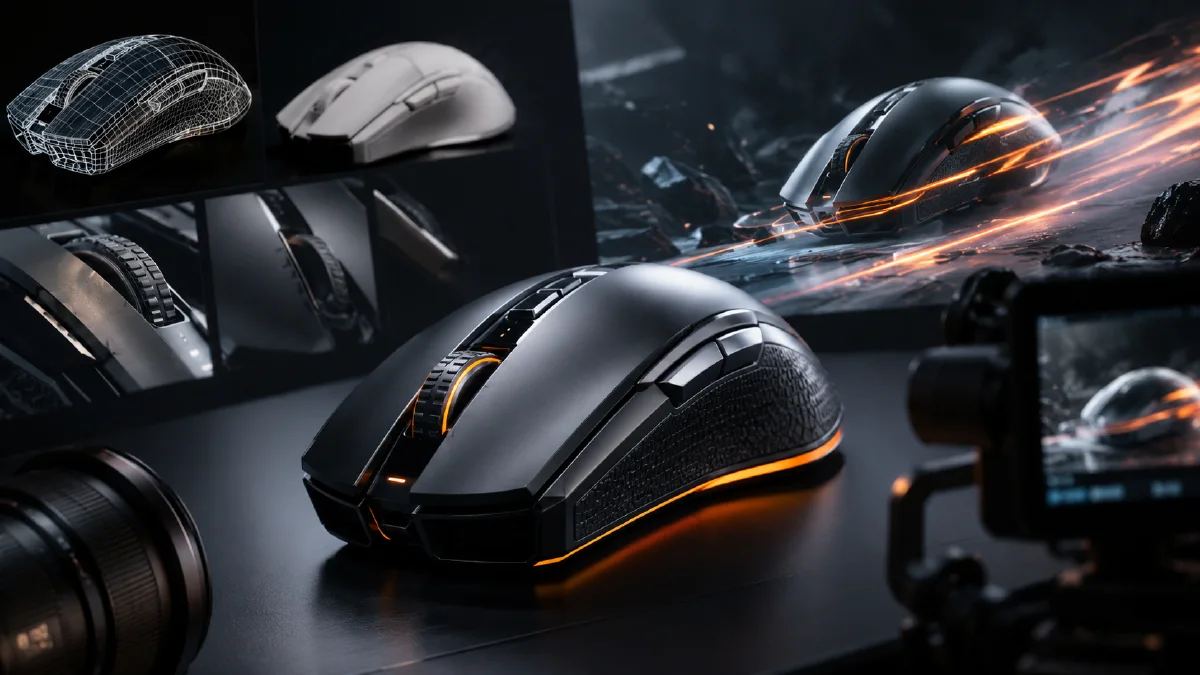
AI Gaming Mouse Product CG Workflow from Hero Image to Motion
Create AI gaming mouse CG visuals with subject replacement, macro detail shots, futuristic studio lighting, and safe image-to-video prompts.
Try this workflow in Naviya
Start from a finished image when the subject, style, or composition should stay stable.
Animate a still image
An AI gaming mouse product campaign needs two things at the same time: a believable object and a charged gaming atmosphere. If the prompt focuses only on atmosphere, the mouse may become a glowing fantasy shape with unusable details. If it focuses only on the mouse, the image can look like a plain catalog cutout. The best workflow separates product control from scene energy, then combines them deliberately.
Use AI Image Generator to design the still frames, Image to Video to animate approved product shots, and AI Video Generator when you want a broader launch film. For a general animation process, pair this guide with AI Product Photography to Video. For stronger contrast and material readability, use the framework in AI lighting prompts, and for campaign mood use cinematic atmosphere prompts.
Build the product before the scene
A gaming mouse has a specific ergonomic body, wheel shape, side button position, surface finish, and cable or wireless identity. These details should be locked before you explore dramatic scenes.
Start with a clean subject prompt:
A white wireless gaming mouse, ergonomic body, clean side buttons,
textured scroll wheel, matte shell, subtle glossy highlights,
isolated on a pure white background, product photography lighting,
front three-quarter view, high resolution, no logo.
The "no logo" instruction is useful when the design is fictional or when brand text will be added later. If you are working with a real product reference, the goal is even stricter: preserve the shape, keep the button layout, and avoid invented marks.
Create a human-use reference shot
Mouse campaigns often benefit from one hand-in-use image because it communicates scale and grip. The hand should not dominate the frame. It should support the product story.
Prompt example:
A hand gripping a white gaming mouse on a dark desk,
dynamic focus on the mouse and fingertips, blue ambient light,
shallow depth of field, esports atmosphere, realistic skin texture,
close-up commercial photograph, crisp mouse detail.
This type of frame can become a social ad opener, a product page image, or a reference for the grip angle. If the hand looks odd, simplify the prompt and reduce the amount of visible anatomy. Product CG should not force the model to solve a difficult hand pose unless the hand is essential.
Separate the mouse for controlled reuse
Once you have a strong mouse design, create a clean isolated version. This makes it easier to place the same mouse into multiple scenes: dark studio, futuristic pedestal, gradient background, desk setup, or motion frame.
In a Naviya workflow, you can create a simple white-background image, then use it as the visual anchor for the next generations. The key instruction is:
Use this mouse design as the product reference. Preserve its body shape,
button layout, scroll wheel, proportions, and material. Change only the scene,
lighting, and camera angle.
This avoids the common mistake of reinventing the product every time the background changes. Consistency is what makes the campaign feel like one product line rather than unrelated concept art.
Four useful gaming mouse image types
| Image type | Purpose | Prompt emphasis |
|---|---|---|
| Black and white macro | Premium detail | Texture, wheel, buttons, high contrast |
| Dynamic studio spin | Motion readiness | Centered product, spotlight, shadow |
| Futuristic floating shot | Launch campaign | Pedestal, LEDs, cool tones |
| Minimal gradient shot | Ecommerce hero | Negative space, clean silhouette |
For the black and white macro:
An extreme close-up front view of a white gaming mouse,
artistic black and white product photography, dark minimal background,
ultra-realistic 3D render, high contrast lighting, detailed scroll wheel,
button texture, clean shell seams, premium gaming accessory.
For the futuristic floating shot:
A white gaming mouse floating above a minimal empty pedestal,
deep gray studio background, subtle blue LED accents, silver details,
centered symmetric composition, futuristic product photography,
cool blue and dark gray tones, crisp commercial render.
For the gradient hero:
A black gaming mouse on a smooth gradient blue background,
dramatic directional light, minimal artistic product photography,
bottom-left composition with large negative space, high resolution,
clean shadow, sharp product edge, refined esports accessory.
These directions are intentionally distinct. A good product set has variety, but every image should still feel like it belongs to the same brand world.
Animate with a small motion budget
Mouse product videos often fail when the prompt asks for too much: full spin, hand interaction, lights, cable movement, logo reveal, and background transformation in one clip. Pick one dominant motion.
Safe motion choices:
- slow orbit around the mouse
- macro push-in toward the scroll wheel
- light sweep across the shell
- floating mouse settles above a base
- blue ambient light pulses in the background
- background fades from dark to gradient
Image-to-video prompt:
Animate this gaming mouse image into a 6 second premium product video.
Camera: slow macro push-in from the front-right toward the scroll wheel.
Lighting: blue rim light moves subtly across the mouse shell.
Product motion: the mouse remains stable and keeps its exact shape.
Atmosphere: dark esports studio, polished, precise, high-end hardware.
Constraints: preserve button layout, scroll wheel, material, color, and proportions.
No logo changes, no extra buttons, no full 360 turn.
If the animation warps the wheel or side buttons, simplify the camera to a locked shot with lighting movement only.
Plan the edit before generating clips
A tight 10 second gaming mouse ad can use three shots:
- A dark macro opener showing the scroll wheel and shell texture.
- A floating hero shot with blue rim light and a subtle platform shadow.
- A final clean product frame with negative space for real campaign text.
Each shot should have one role. The opener earns attention. The hero shot sells the product. The final shot leaves room for the offer. This is easier to control than one overloaded AI clip.
Detail hierarchy for gaming hardware
Gaming mouse ads fail quickly when the product details drift. Before writing atmosphere, decide which details are protected: shell silhouette, primary buttons, side buttons, scroll wheel, cable or wireless dock, lighting zones, and surface finish. Put those details in the prompt before effects. RGB, smoke, sparks, and floating platforms should support the mouse, not rewrite it.
For a product-page visual, keep the camera simple and let texture do the work. For a launch teaser, use darker lighting and a sharper reveal, but still keep the top profile recognizable. For performance audiences, show functional cues such as grip shape, low-friction feet, or side-button reach. For lifestyle audiences, place the mouse in a clean desk scene with keyboard, monitor glow, and enough negative space for copy.
If a clip looks exciting but the button layout changes, reject it. Hardware buyers notice control placement immediately, and an inaccurate render can damage trust more than a plain image.
Try it in Naviya
Start in AI Image Generator with a clean mouse subject, then generate two or three scene variants. When you have a stable frame, use Image to Video for controlled motion. For a complete campaign sequence, assemble the best prompts in AI Video Generator.
The practical rule is simple: design the mouse once, reuse it carefully, and let lighting and camera provide the variation. That keeps the product recognizable while still giving the campaign enough energy for ecommerce pages, launch videos, and social ads.